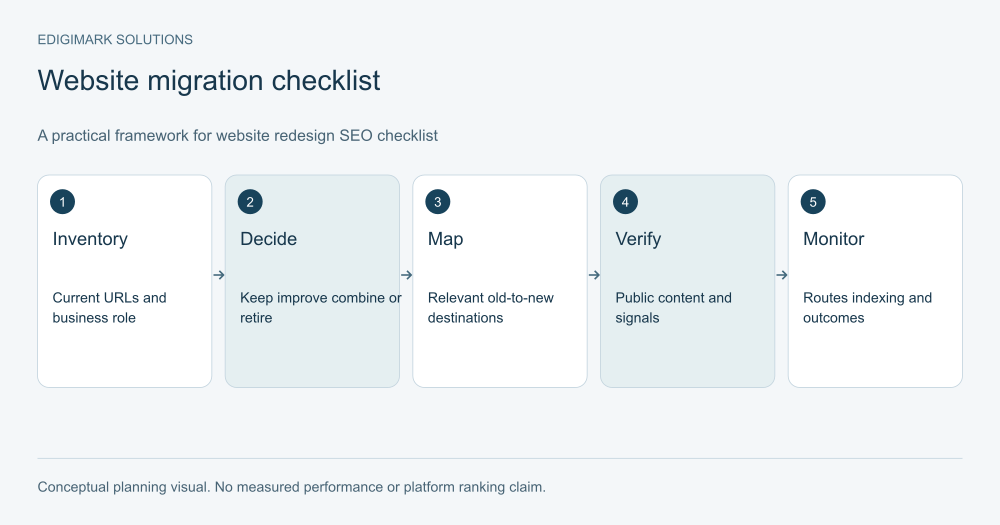
A website redesign SEO checklist protects the information, URLs and technical signals that help people and search systems reach your important pages. Inventory the current site, decide what is changing, map affected URLs, verify the new experience before launch and monitor the public routes afterward. Careful planning reduces avoidable disruption; it cannot guarantee that search visibility will remain unchanged during a significant redesign.
A redesign is more than a new visual theme when it also changes content, navigation, URLs, CMS behaviour or rendering. The project should make those changes explicit so the team knows what must be preserved, tested or deliberately retired.
In this guide
- What should the website redesign SEO checklist cover?
- Before design: How do you inventory the existing site?
- Before migration: What should be kept, improved, combined or retired?
- How should URL redirect mapping be prepared?
- Which redirect behaviours need verification?
- How should migration canonical tags be reviewed?
- What content and metadata should be checked on the new pages?
- How should internal links and navigation be tested?
- Which staging controls must be handled deliberately?
- How should migration indexing checks be scheduled?
- What should the website redesign launch plan contain?
- How should post-launch monitoring distinguish faults from uncertainty?
- What would a practical migration decision look like?
- How should a website redesign SEO project close?
- What extra SEO checks does a headless website redesign need?
- How should SEO findings be communicated to the launch team?
- Frequently asked questions
What should the website redesign SEO checklist cover?
Define the project’s scope: visual layout, page content, information architecture, URL paths, domain, CMS, hosting or combinations of these. A design-only change has different dependencies from a domain and CMS migration.
Agree on the business-critical journeys. Include commercial pages, useful resources, forms, booking paths, downloads and product or documentation routes. Search traffic is important, but the launch must also keep suitable visitors able to act.
Assign owners for content decisions, implementation, SEO checks, analytics and launch approval. One person may hold several roles, but the responsibilities should be visible.
Web development and digital marketing should share the scope and test plan rather than reviewing different versions of what the redesign is supposed to achieve.
Before design: How do you inventory the existing site?
Create a list of current public URLs and their purpose. Use available CMS exports, crawls, analytics and other records to identify important pages. Include downloadable assets and commercial destinations that may be overlooked in a visual page list.
Record which pages attract relevant visits, support enquiries or purchases, receive useful external references or answer important customer questions. A low-traffic page can still have a critical role in a commercial journey.
Capture the current content and important metadata. Keep enough information to compare the new version and investigate a later issue. Do not rely entirely on an old screenshot if the task involves titles, links or structured data.
The inventory is a decision tool, not an instruction to preserve every old page forever. It helps the team distinguish deliberate changes from accidental omissions.
Before migration: What should be kept, improved, combined or retired?
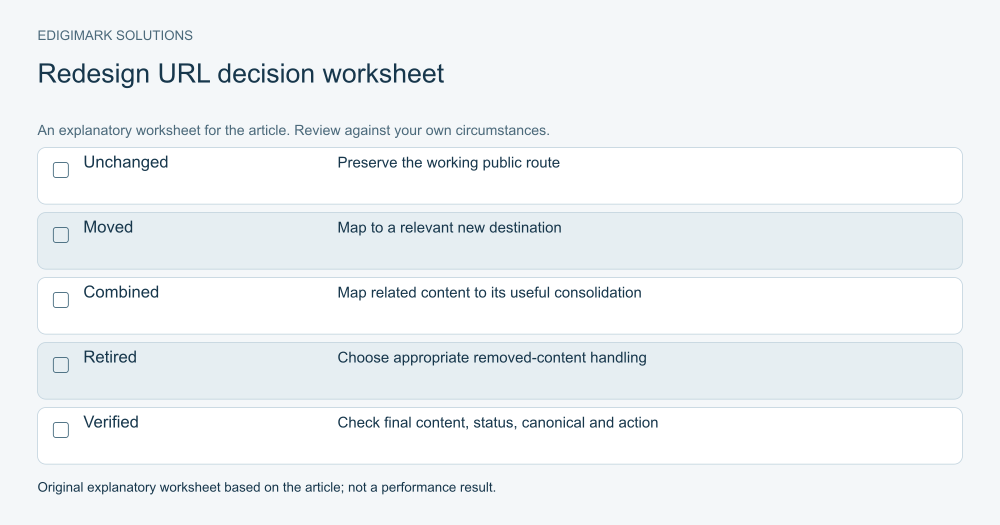
Give each affected page a decision and a reason. Keep useful accurate pages, improve material gaps, consolidate genuine overlap and retire content that no longer serves a legitimate purpose.
Include the subject expert in content changes. A designer may not know which implementation requirement prevents unsuitable enquiries. A writer may not know which product limitation has changed. Preserve decision-critical information even when the visual structure changes.
Do not remove a page simply because it looks old or receives modest traffic. Review its role and references first. Equally, do not keep inaccurate content solely because it once attracted visits.
Document the new destination or treatment for each changed URL. The team should be able to explain where a person following an old link will arrive and why that result is relevant.
How should URL redirect mapping be prepared?
Build a mapping from affected old URLs to the appropriate new destinations. Record unchanged routes separately so the launch team does not create unnecessary redirects.
Google’s site-move guidance recommends accurate mapping and relevant destinations. It warns against sending many unrelated old pages to one irrelevant page, such as a homepage. A genuinely consolidated page can be an appropriate destination for material combined into it.
Where content is intentionally removed without a relevant replacement, plan the correct response instead of hiding the removal behind an unrelated redirect. Review the intended user experience and the technical implementation with the developer.
Keep the mapping versioned and owned. Content decisions can change during a redesign, and an outdated map can lead to the wrong destination even when the redirect rules work technically.
Which redirect behaviours need verification?
For permanent moves, Google’s redirect documentation describes permanent server-side redirects such as 301 and 308 as appropriate signals. Choose the method suited to the infrastructure and verify the live response.
Test the full path from old URL to final destination. Avoid unnecessary chains and loops. Confirm that the destination works and provides relevant content rather than a generic error or unrelated page.
Include important URL variants when they are part of the live site. Query strings, trailing slashes or case handling can affect routing in a particular system. The developer should identify the actual variants rather than add broad rules without understanding their consequences.
Test representative routes and the full mapping where feasible. A homepage redirect passing a check does not prove every product, service and download route works.
How should migration canonical tags be reviewed?
Choose the intended public URL for each important page and inspect the canonical rendered on that public route. A CMS field can be correct while a separate frontend outputs a different value.
Google’s canonical guidance describes canonical signals as a way to express a preferred version among duplicate or similar URLs. Canonical selection remains a search-system decision; the tag is not a guarantee of indexing or visibility.
Check for stale staging domains, previous paths or conflicting signals. Align internal links and sitemap entries with the intended destination. Do not use a canonical as a substitute for a required redirect or as a way to conceal a broken public URL.
In a headless setup, verify the rendered frontend rather than assuming a metadata value saved in the CMS reaches the page correctly.
What content and metadata should be checked on the new pages?
Compare important pages with the approved content plan. Verify titles, main headings, essential explanations, relevant images and contextual links. Confirm that product or service scope remains accurate.
Inspect the live or production-equivalent rendered page, not only the editing interface. A theme or frontend can add another heading, omit a description, point an image at the wrong host or fail to render structured data as intended.
Review social metadata and structured data where the site uses them. The values should describe the real page and use appropriate public URLs. Do not add schema for content that is not present or imply unsupported facts about the business.
Keep a comparison record for key pages. It helps distinguish intentional editorial improvements from migration mistakes and gives subject experts a clear review task.
How should internal links and navigation be tested?
Update links to the intended destinations rather than relying on redirects for every internal journey. Check menus, footer routes, contextual links, breadcrumbs and prominent actions.
Ask a representative user to find an important service or product and complete the relevant task. A new navigation scheme can look tidy while making the commercial journey harder to understand.
Use descriptive labels and preserve useful relationships between supporting content and commercial pages. Avoid isolating a blog section after the redesign if its resources are meant to help buyers evaluate the offer.
Record broken or confusing routes with an owner and verification plan. Conversion rate optimization can help evaluate the user task when the redesign changes the path to an enquiry or purchase.
Which staging controls must be handled deliberately?
Protect staging from unintended public exposure using an appropriate setup, then document which restrictions must change for production. The launch team should know the intended robots and indexing behaviour for each environment.
Inspect production pages for accidental noindex rules, access restrictions and incorrect robots handling. Do not remove every restriction blindly; some routes may intentionally remain private or excluded.
Check environment-specific URLs in assets, canonicals, feeds and structured data. A production page pointing to a staging host can be a sign that deployment configuration was not fully reviewed.
Keep this work with the implementation owner. A launch checklist should contain verified public behaviour, not only a statement that the team remembered to change a setting.
How should migration indexing checks be scheduled?
Confirm the appropriate Search Console access remains available and the relevant properties reflect the project. Use inspection and indexing reports to investigate important URLs after launch.
Submit or maintain a sitemap using the intended public routes and check that it is accessible. A sitemap supports discovery; it does not guarantee that every listed page will be indexed.
Monitor old and new URL behaviour where routes changed. Look for unexpected errors, irrelevant destinations and important pages missing their intended content. Use logs or appropriate diagnostics when available.
Set review responsibility before launch. Monitoring should not depend on someone noticing a traffic graph weeks later. The team needs a route for reporting, investigating and fixing concrete faults.
What should the website redesign launch plan contain?
Include the approved content and URL decisions, the deployment owner, test list, verification responsibilities and a practical rollback or recovery plan. Clarify which evidence is required before launch approval.
Schedule the release with the business’s operating context in mind. The team should be available to verify and handle issues. A launch immediately before everyone becomes unavailable can make repair harder.
Test the business actions as well as search signals. Forms should reach the correct owner, bookings should use the intended schedule and purchases should complete. CRM integration dependencies should be checked when the redesign changes lead capture.
Record the launch date and material changes. Data analytics needs that context to interpret later movement without attributing everything to one visual update.
How should post-launch monitoring distinguish faults from uncertainty?
Fix concrete failures promptly: wrong redirects, broken pages, accidental restrictions, missing content or failed actions. These do not need weeks of performance observation before being addressed.
Interpret search movement more cautiously. A significant change can produce temporary fluctuation while systems process the site. The timing varies, and a checklist cannot promise a fixed recovery date.
Compare relevant pages and queries, allowing for seasonality, offer changes and reporting differences. Do not assume an overall decline proves a redirect fault, or an overall rise proves the migration was perfect.
Keep the issue log connected with the monitoring. A report should show the evidence, affected route, owner and status so the team can separate resolved implementation problems from outcomes still being observed.
What would a practical migration decision look like?
Consider a hypothetical consultancy combining two overlapping service pages during a redesign. The team confirms that the new page accurately covers both purposes, records the consolidation and maps the old routes to that relevant destination.
It updates internal links, verifies the final public page and checks the action and metadata. After launch, it monitors route behaviour and appropriate enquiries. It does not redirect unrelated guides to the same service page merely to reduce the URL count.
This is an illustrative project decision, not a client result or a guarantee of ranking preservation. The useful principle is that content, route and user experience decisions agree.
How should a website redesign SEO project close?
Confirm the approved routes, content and commercial tasks are working, and assign ownership for remaining observation and maintenance. Keep the mapping, test records and decision log available.
Do not remove old-route handling simply because the visual launch is complete. Review the appropriate ongoing treatment with the technical team and current guidance. Old external links and returning visitors can remain relevant after the project ends.
Discuss your redesign plan with Edigimark if you need to connect design, content, URL decisions and post-launch verification before the site changes.
What extra SEO checks does a headless website redesign need?
Separate the authoring system from the public renderer in the test plan. The CMS can save the correct title, canonical or social image while the frontend ignores the field or uses a different fallback. Verify the public HTML and the visitor experience on the intended domain.
Check how new and updated content reaches the live site. The deployment or cache-refresh process should be known, with an owner able to confirm that the approved version is public. A successful CMS save is not the same event as a verified frontend update.
Test assets and links from the public page. A CMS-hosted image may be appropriate, but a canonical pointing to the authoring host may be a configuration error. The intended URL policy should be explicit rather than inferred from whichever value is easiest to obtain.
Keep CMS and frontend verification together for key templates. A review limited to one layer can miss a problem introduced by the other.
How should SEO findings be communicated to the launch team?
Write each finding as a concrete route and behaviour: the public page, expected result, observed result, evidence and responsible owner. “SEO is broken” is too broad to repair, while “this production page still renders a staging canonical” identifies a testable issue.
Separate blockers from advisory improvements. A wrong destination or failed enquiry requires immediate attention. An uncertain editorial idea may belong in a later backlog. That distinction helps the launch decision remain clear under time pressure.
Confirm fixes through the same public test that exposed them. Do not close a finding only because a setting was changed or a developer said the code was deployed. The task is complete when the intended behaviour is verified.
This communication method makes the redesign reviewable across design, content, development and marketing. It also preserves a practical record for the person maintaining the site after the project team moves on.
Retain that verification record with the final URL map so future changes can be compared with the approved launch behaviour.
Frequently asked questions
Should a redesign change every URL?
No. Change a URL when there is a clear reason, and plan the appropriate treatment. Cosmetic tidiness alone may not justify disrupting a working route. Preserve unchanged pages where appropriate and document every affected destination.
Can redirects guarantee rankings remain unchanged?
No. Appropriate redirects support a move, but visibility also depends on content, technical behaviour and search processing. A redesign can change several factors. Plan and verify carefully while avoiding guarantees about positions or timing.
Is a canonical tag enough when a page moves?
It serves a different purpose from moving a visitor to a new route. Review the appropriate redirect and canonical treatment together. The public destination should work, describe the intended page and align with the site’s other URL signals.
Should removed pages all redirect to the homepage?
No. Use a relevant replacement where one exists. An unrelated destination can confuse users and search systems. Intentionally removed content without a suitable replacement needs appropriate handling rather than a blanket homepage redirect.
What should be tested immediately after launch?
Verify important public routes, redirect destinations, page content, metadata, indexing controls and commercial actions. Confirm that enquiries or orders reach the right systems. Then continue monitoring search and business outcomes with their timing and limitations understood.