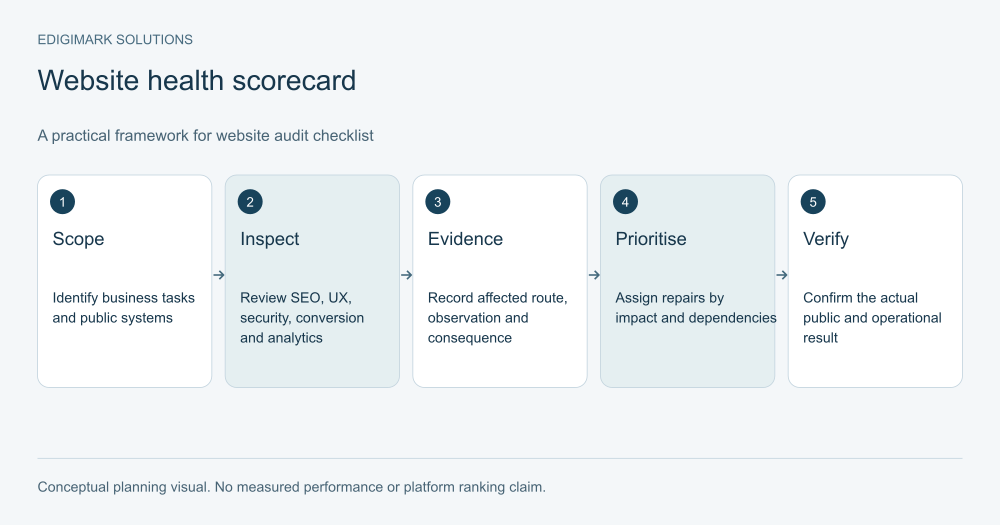
A website audit checklist should examine whether your business website can be found, understood, trusted, used and measured. Review SEO, customer journeys, security ownership, conversion paths and analytics together, then turn evidence into repairs with named owners. For a 2027 plan, use current guidance as a baseline and recheck changing platform requirements before implementation.
A business website audit is useful when it explains what to fix and why. A report with hundreds of warnings can still leave the team unsure whether the enquiry form works or the right people can find the services. Begin with important business tasks and trace the systems that support them.
This checklist covers website readiness. It is broader than a conversion audit and more focused than a review of every marketing channel. It does not replace specialist security testing or guarantee search visibility.
In this guide
- How should a business website audit be scoped?
- What evidence belongs in the website audit checklist?
- Which SEO checks belong in a website readiness audit?
- What should a website UX audit test?
- Which conversion checks should the website audit include?
- What do website security checks cover at business level?
- What should a website analytics audit verify?
- How should CRM and integration checks be performed?
- How should website performance be included in the audit?
- How should a website health scorecard avoid hiding risks?
- How should website audit findings be prioritised for a 2027 plan?
- Who should own the website audit repairs?
- How can a website audit be turned into a recurring process?
- Which pages and tools should be retired after the audit?
- Frequently asked questions
How should a business website audit be scoped?
Write the business purpose of the website in practical terms: explain services, generate suitable enquiries, enable orders, support customers or provide product information. Identify which outcomes matter and which pages contribute to them.
List representative templates and journeys. A homepage, service page, product page, article, form and external booking route may behave differently. Include the mobile experience and the complete path after the visible call to action.
Record domains, subdomains, CMS, frontend, hosting, forms, analytics and connected systems. A public page and its publishing system can be separate. The audit needs to follow the actual visitor experience rather than assume a CMS preview reflects production.
Agree who can provide access and approve repairs. Web development, digital marketing and the business owner need a shared scope. An unsupported integration should become an ownership finding rather than disappear between teams.
What evidence belongs in the website audit checklist?
For every finding, record the affected URL or system, expected behaviour, observed behaviour, evidence, business consequence and owner. Note the device and date when those conditions matter.
Use statuses such as verified, failed, needs investigation and not applicable. “Not tested” should remain visible. A green mark without evidence can create false confidence, especially for backups, tracking and form delivery.
Distinguish repeated template issues from individual page issues. Ten broken pages caused by one component need a component repair and representative verification. Ten unrelated outdated offers need content ownership and page-specific decisions.
Keep raw evidence proportionate. Screenshots and logs can contain personal or sensitive information; retain only what the review needs and store it appropriately. The deliverable should explain the finding clearly without distributing unnecessary customer records.
Which SEO checks belong in a website readiness audit?
Start with important public URLs. Verify that intended pages load, contain useful visible content and can be reached through meaningful internal navigation. Check for accidental access restrictions or indexing controls left from development.
Google’s Search Essentials separates technical requirements, spam policies and useful practices. Meeting technical requirements makes content eligible for consideration; it does not promise indexing or a position.
Review page titles, descriptive headings, relevant copy and internal links. A title should accurately describe the page. A service page needs enough information to help a suitable buyer understand the offer, rather than repeating the same phrase across headings.
Check the preferred public URL, canonical implementation, redirects and sitemap entries together. The audit should flag conflicting signals and irrelevant redirects. Any proposed change needs a map of the pages affected so useful routes are preserved.
How should content quality be checked?
Ask whether the page answers the audience’s actual question, identifies its purpose and supports important claims. Remove obsolete offers, unexplained jargon and facts that no longer reflect delivery.
Assess duplication by purpose. Similar services may need separate pages when the customer task differs; mechanically copied pages with only a city or product name changed may offer little additional value.
Assign content owners and review triggers. A price change, new eligibility rule or discontinued service should prompt a page update. The audit should leave an operating process, not only a list of corrections for the present week.
What should a website UX audit test?
Give a representative visitor a concrete task: find whether a service fits, compare options, locate delivery information or request a discussion. Observe where they hesitate or lose context.
Test navigation on relevant screens. Menu labels should make sense to visitors rather than mirror internal departments. Check that important information remains available when the navigation collapses on a phone.
Review readability, contrast, controls, focus behaviour and form feedback. W3C’s forms tutorial explains the roles of labels, instructions and feedback in accessible forms. Use those principles to investigate actual barriers, with specialist accessibility review where needed.
Include loading and interaction behaviour in the task. A page can display quickly but respond poorly when someone changes an option or submits an enquiry. Web development should receive the conditions that reproduce a problem, not an instruction simply to “make UX better.”
Which conversion checks should the website audit include?
Identify the action each commercial page supports. A service page may invite a qualified enquiry, while a technical guide may help someone evaluate requirements before contacting sales.
Check that the call to action describes what happens next. “Request a proposal” should not unexpectedly open an unrelated newsletter signup. Confirm the form, scheduling tool or checkout matches the promise.
Test the entire submission path with authorised test data. Verify the success state, delivery, CRM record, owner assignment and next response. A visible confirmation does not prove the business received the request.
Review evidence near the decision. Relevant examples, accurate process details and clear requirements help a buyer judge suitability. Conversion rate optimization should work with lead quality as well as completion rate; an increase in unsuitable submissions is not the intended outcome.
What do website security checks cover at business level?
Review who controls hosting, domain registration, CMS administration and connected services. Identify named account owners, current access and the process for removing access when a role ends.
Confirm the technical owner reviews authentication and recovery controls. OWASP’s authentication guidance covers areas including multifactor authentication, recovery and protection of sensitive actions. Record the controls in use and unresolved responsibilities without exposing credentials in the audit.
Check that updates and supported components have owners. Ask how patches are evaluated, tested and deployed. An abandoned plugin or unknown integration deserves investigation even when the public page appears normal.
Verify backup responsibility and evidence of restoration testing in an appropriate environment. “Backups enabled” is incomplete if nobody knows what is included, where recovery instructions live or whether a restore works.
How should security findings become actionable work?
Describe the asset, missing control and responsible owner. Business reviewers need to understand the operational consequence; technical reviewers need enough detail to validate and repair it.
Use authorised specialists for deeper assessment. Do not improvise disruptive testing against production during a general marketing audit. A finding that needs specialist investigation can remain open with an owner and a scheduled review.
Keep confidential technical evidence in the appropriate restricted location. The customer-facing marketing report can refer to the issue and remediation status without reproducing sensitive configuration or secret material.
What should a website analytics audit verify?
Start with the questions the business expects analytics to answer. Which source brings suitable visitors? Which page supports useful enquiries? Where does a task fail? Each question needs a defined event or record and an understood reporting scope.
Google Analytics describes events as measurements of interactions or occurrences. A business outcome still needs a precise implementation and verification. A button click and a successfully received enquiry are different observations.
Trace important actions through the measurement tools and the operational system. Check for duplicate recording, missing steps and events that fire on the wrong condition. Document consent-related behaviour and any expected gaps in observation.
Review campaign naming and source attribution with the team using the reports. Data analytics can reconcile definitions and explain uncertainty. A dashboard should identify its period, denominator and known limitations rather than present apparently precise rates without context.
How should CRM and integration checks be performed?
For each important form or commercial action, identify the destination system, field mapping, matching rule and responsible owner. Verify that essential context reaches the person handling the request.
Check duplicates and failures. A second request from an existing contact should follow an intentional rule, not automatically create conflicting identities. A failed delivery should appear somewhere a named person monitors.
Review how preference changes and lifecycle states move between systems. A marketing subscription setting is not interchangeable with a sales stage. CRM integration should preserve those distinctions and define which system owns each field.
Test realistic exceptions: missing company information, an existing customer, an owner unavailable and a repeated submission. Exceptions often reveal more about operational readiness than a single ideal test record.
How should website performance be included in the audit?
Measure representative templates and important interactions. Use available field data to understand user experience, and controlled diagnostics to investigate causes. Record when field data is insufficient rather than implying a pass.
Google’s Core Web Vitals guidance distinguishes loading, responsiveness and visual stability. These measures support diagnosis; they do not explain every usability or commercial issue.
Inspect large assets, scripts and third-party tools where evidence points to a problem. Verify the full customer task after changing them. Removing a tool that supports booking or appropriate consent can introduce a new failure while improving an isolated performance score.
Assign maintenance triggers. New widgets, campaign pages and content components can change the experience. Include performance checks in the release process for important routes rather than waiting for the next annual audit.
How should a website health scorecard avoid hiding risks?
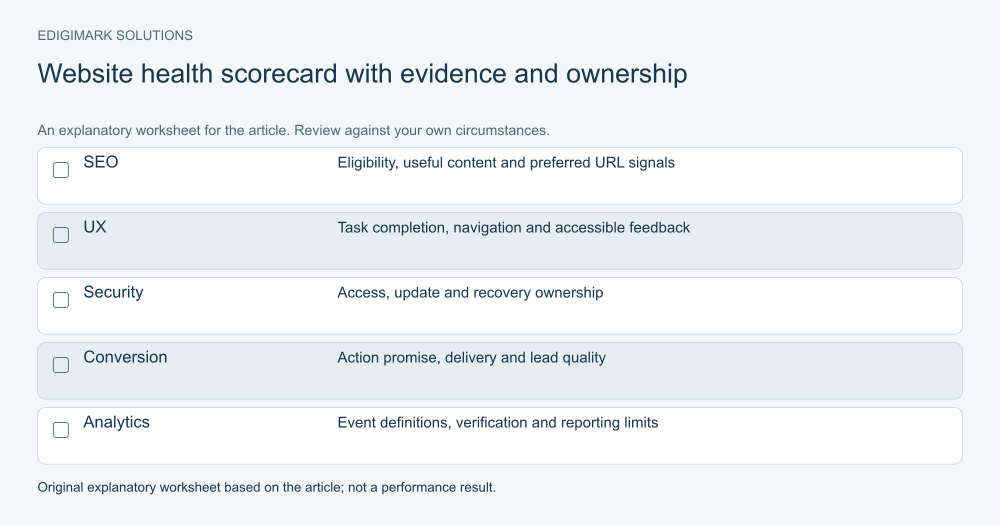
Use a scorecard to summarise verified evidence across SEO, UX, security ownership, conversion and analytics. Keep the underlying findings available. A total score is a presentation choice, not proof of website quality.
A critical form failure should stay visible even if dozens of minor items pass. Do not average it away. Use clear priority bands that reflect business interruption, exposure, audience impact and confidence in the diagnosis.
For example, a hypothetical business may have accurate page titles and working navigation but lose enquiries before they reach the CRM. The next repair should address enquiry delivery, with verification of the complete route. Adding more content would not resolve that operational finding.
The accompanying scorecard should display each area’s status, evidence and owner. It should avoid invented numerical benchmarks or a decorative “health percentage” that suggests a standard the audit has not established.
How should website audit findings be prioritised for a 2027 plan?
Begin with failures that block important actions, create serious operational exposure or undermine measurement needed for decisions. Then review improvements by expected usefulness, evidence strength, effort and dependencies.
Separate immediate repairs from larger projects. Correcting an outdated contact route may be straightforward. Replacing an unsupported integration may require a migration plan, testing and staff training.
Label forecasts as estimates. The audit can show that a barrier exists without promising a fixed revenue uplift after its removal. A commercial projection needs its own assumptions and uncertainty.
For 2027 planning, add dates to recheck platform documentation, supported software and business requirements. Future search updates and tool capabilities are not known facts in October 2026. Build a reviewable plan that can adapt when requirements change.
Who should own the website audit repairs?
Assign one accountable owner per finding, even when several teams contribute. The owner coordinates the implementation, evidence and closure. Shared responsibility without a named coordinator often leaves the same issue open in multiple task lists.
Write acceptance criteria before the repair. A fixed form must submit, confirm, deliver and assign correctly. A corrected canonical must appear on the actual public page and agree with the intended URL strategy.
Record dependencies and rollback arrangements for consequential changes. Schedule work so connected systems can be tested together. A page update that changes a field name can affect routing and analytics beyond the visible interface.
Close the finding only after public or operational verification appropriate to the issue. A developer’s completed task, CMS save or successful preview is useful evidence of progress, but it may not confirm the production result.
How can a website audit be turned into a recurring process?
Keep a small set of important journeys under regular review and schedule deeper checks around significant changes. The frequency should match the website’s activity and operational needs.
Maintain the inventory, ownership list and evidence log. They reduce the time needed to investigate the next problem and make staff changes less disruptive.
Review the backlog with the business owner. Explain completed repairs, unresolved dependencies and findings that need a decision. Preserve rejected recommendations with their reasons so the same debate does not restart without new evidence.
Ask Edigimark to connect your website audit with a practical repair plan when SEO, UX, analytics and enquiry handling are currently reviewed in separate reports.
Which pages and tools should be retired after the audit?
Review obsolete campaign pages, duplicate tools and unsupported components with their owners. Confirm whether each still receives useful visits, serves an active customer need or connects to another system before deciding to remove it.
A page retirement needs an appropriate destination or a deliberate removal decision. A tool retirement needs checks for forms, reporting and other dependent functions. Document the choice and verify the public result. This prevents a tidy inventory from becoming an accidental loss of useful content or operational capability.
Frequently asked questions
How often should a business website be audited?
Use regular checks for important journeys and broader reviews after significant content, design, platform or integration changes. An annual plan can organise deeper work, but it should not delay a known form or measurement failure.
Does a website audit checklist guarantee better rankings?
No. It helps identify technical and content issues and supports useful repairs. Search visibility depends on wider factors, and meeting technical requirements does not guarantee indexing or a position.
Is a marketing website audit the same as security testing?
No. The general audit can review ownership and evidence of controls. Specialist security assessment investigates risks in greater depth with an agreed scope, suitable methods and appropriate authorisation.
Should every audit finding receive a numerical score?
No. Clear status, evidence, consequence and ownership are often more useful. A score can summarise priorities if its method is explained, but it should never hide a critical failure behind an average.
What should happen after the website audit report is delivered?
Turn findings into owned tasks with acceptance criteria, dependencies and verification. Review progress with the business and retain the evidence needed to confirm that the repair works in the actual customer journey.