CRM and marketing automation integration connects the records and actions used to acquire, nurture and serve a lead. It should preserve identity, request context, ownership, communication preferences and useful sales feedback across systems. A working connection is only the starting point: the business also needs clear field ownership, matching rules and exception handling.
The practical goal is a reliable shared view of the relationship. Marketing should understand which contacts need relevant help and which are already speaking to sales. Sales should understand why a lead arrived and what is known about its needs. Reporting should connect those activities without inventing certainty the data does not support.
This article focuses on integration architecture and data quality. Design the information contract before expanding automated journeys.
In this guide
- How should CRM and marketing automation integration divide ownership?
- What should the CRM marketing data flow include?
- How should CRM integration identity matching be designed?
- What belongs in a CRM field mapping specification?
- How should lead lifecycle sync be governed?
- How should communication preferences move between systems?
- How should conflicting CRM and automation updates be resolved?
- How can integration loops and duplicate actions be prevented?
- What should integration failure monitoring include?
- What should acquisition to sales tracking measure?
- How should an existing database be prepared for integration?
- What should a CRM integration pilot test?
- What does a practical CRM integration example show?
- How should integration ownership survive team and tool changes?
- What should happen when an integration is paused or replaced?
- Frequently asked questions
How should CRM and marketing automation integration divide ownership?
Define responsibility by record and task rather than assume a universal product boundary. A CRM commonly holds account relationships, sales ownership and opportunity outcomes. An automation system commonly manages eligible campaign actions and nurture progression. Products can overlap.
For each important field, identify the authoritative system and the team responsible for its meaning. Sales may own the accepted opportunity stage, while the preference system owns the current communication choice.
Separate business authority from technical location. A property can be stored in both systems while only one is permitted to initiate a certain kind of change. The integration needs to implement that agreement.
CRM integration and marketing automation should share this map. A connector cannot resolve a disagreement about what a stage or owner is supposed to mean.
What should the CRM marketing data flow include?
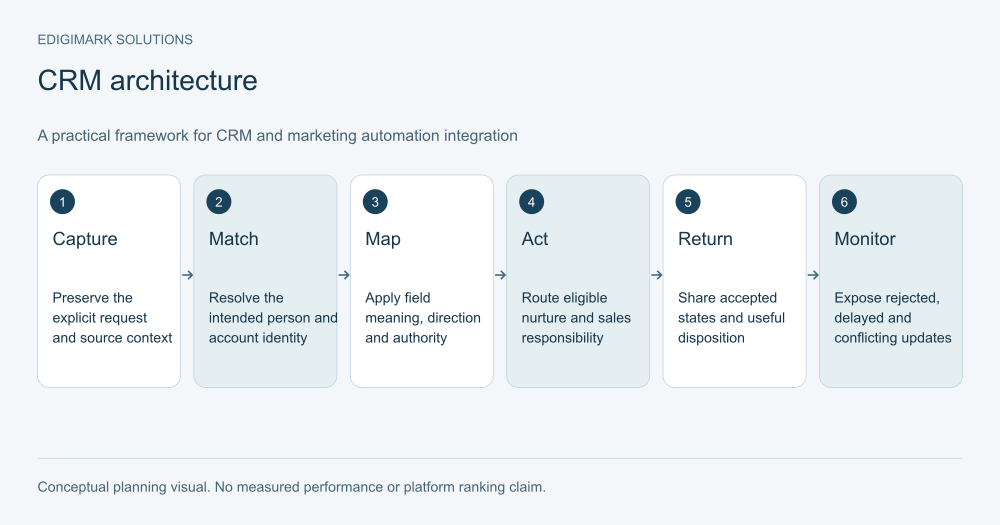
Map the smallest useful flow from acquisition to sales and back. An explicit request enters through a form or another authorised source, is matched to the right identity and carries the context needed for response.
Relevant attributes and preferences inform eligible nurture. When an agreed condition warrants sales review, the receiving record includes the request and useful evidence. Sales then records acceptance, disposition or commercial progression.
Return the information marketing needs to adapt the next action. An active conversation may pause generic nurture. A confirmed mismatch may stop the acquisition path. A postponed project may lead to a context-appropriate later response.
Do not synchronise every available activity by default. A concise summary of meaningful interest may support sales better than an unfiltered event history. Choose data because it supports a decision or necessary operation.
How should CRM integration identity matching be designed?
Decide which records represent a person, an account, an enquiry and an opportunity. A repeated request is a new interaction with a relationship; it does not always require a new person record.
Review the connector’s supported matching rules. HubSpot’s record matching documentation explains that matching configuration affects duplicates and sync outcomes. Verify the actual integration rather than assuming every connector uses the same identifier.
Test changes in identifying information and known duplicates. A new email address, changed company name or shared address can require a business judgement about identity. Avoid an automatic merge rule that combines unrelated people simply because one attribute appears similar.
Keep cross-system identifiers available to the integration owner. They help trace a rejected update or incorrect association. Business users should have a clear way to report suspected duplicates without needing to understand the technical matching implementation.
What belongs in a CRM field mapping specification?
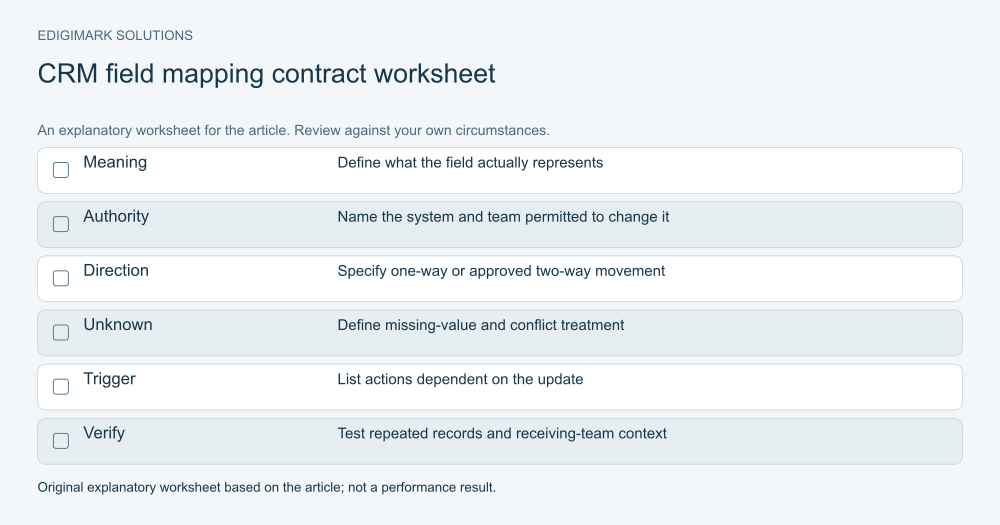
For each mapped field, document source, destination, data type, meaning, permitted values, direction, authority and unknown-value handling. Add any transformation needed to preserve meaning.
An integration can copy a value accurately while changing its interpretation. A “qualified” option in one system may describe marketing review, while the same word in another describes sales acceptance. Map the agreed states, not only the text labels.
The following is an illustrative field contract, not a universal vendor configuration:
| Field | Intended meaning | Authority | Required treatment |
|---|---|---|---|
| Person identifier | Stable relationship identity | Agreed identity system | Match and preserve association |
| Request context | What the person explicitly asked | Capture process | Preserve original detail |
| Sales owner | Person accountable for response | Sales operating process | Respect existing relationship |
| Lifecycle stage | Agreed relationship milestone | Defined by milestone | Apply permitted transition |
| Communication preference | Current choice for relevant contact | Preference source | Preserve purpose and latest valid change |
| Disposition | Outcome of a receiving-team review | Sales process | Return a useful reason and next action |
Review the contract with the people who use the values. A technically correct mapping is insufficient if the receiving team does not understand the field’s meaning.
How should lead lifecycle sync be governed?
Write the condition behind each transition and the system allowed to initiate it. A form submission may create a captured lead, while sales acceptance may require a human decision.
Keep stages distinct from activity counts and message status. An email delivered is an interaction state; a sales-qualified lead is a business judgement. Copying one into the other can distort both routing and reporting.
Define what happens when a relationship moves out of the standard path. Existing customers, support cases, postponed projects and partner requests may need separate handling. Check how the chosen platforms support those changes.
Preserve transition dates where they are needed for reporting, with clearly understood semantics. A current-stage field alone cannot explain how long a record spent in previous states or why a rule changed its classification.
How should communication preferences move between systems?
Identify the source responsible for each relevant choice and how it is communicated to systems that perform actions. Keep preferences distinguishable from marketing categories, sales qualification and record existence.
Microsoft’s Customer Insights consent documentation illustrates a model that evaluates the contact point and message purpose. Other platforms have their own implementation. Verify the model in use and preserve the distinctions it requires.
A person can remain a valid customer or lead record while declining a category of marketing communication. Do not erase relationship context simply because a campaign should stop.
Test preference changes during a waiting period and through different entry points. The integration must support the intended current choice before an action executes. A historical import or delayed update should not silently overwrite a newer preference.
How should conflicting CRM and automation updates be resolved?
Agree conflict rules at the field level. “The newest timestamp always wins” can be inappropriate when a low-confidence import overwrites a verified sales decision. “The CRM always wins” can be inappropriate for a preference change originating elsewhere.
Distinguish authority from freshness. The authorised source should be clear, while the date and origin help determine whether a particular change is valid. Some conflicts should become a review task rather than an automatic overwrite.
HubSpot’s data sync configuration guide describes sync direction and conflict settings. Those options implement a decision; they do not decide which information your business should trust.
Use test cases where both systems change a value. Verify the expected result, visible history and downstream actions. A conflict rule should be understandable to the owner who will investigate it later.
How can integration loops and duplicate actions be prevented?
Map what each update triggers in both systems. A field change can start a workflow, which changes another field, which syncs back and starts a second process. Inspect the full chain rather than each rule in isolation.
Define what constitutes the same request or event when repeated delivery is possible. The intended result may be an update to an existing task, rather than another task for the same action.
Make repeat handling explicit in the design and the tests. A retry after a temporary failure should not create a second enquiry or restart an unrelated message sequence. The technical implementation depends on the connector and platform.
Keep business acceptance criteria clear: one accountable response per request, preserved context and no conflicting messages. Ask the implementation owner to demonstrate those outcomes under representative repeated and delayed updates.
What should integration failure monitoring include?
Identify how missing, rejected and delayed records appear. A connection status alone may not show whether a particular lead reached the receiving system with all required information.
Assign an owner to monitor the exceptions and a route for business users to raise missing context. Record the affected identifiers, attempted operation and next action without exposing unnecessary personal information in shared reports.
Distinguish temporary retry from manual correction. A missing required value may need a person to clarify it. Repeating the same invalid update indefinitely does not resolve the underlying problem.
Decide whether downstream actions should pause while a failure is unresolved. If ownership or eligibility is uncertain, continuing a message path can create a poorer experience. The pause must also leave an appropriate route for handling explicit customer requests.
What should acquisition to sales tracking measure?
Preserve useful acquisition context and link it with the correct relationship and commercial records. Define how source, campaign and request information are recorded rather than assuming one field answers every attribution question.
Separate first acquisition, later interaction and opportunity context. A lead may return through another channel or involve additional people from the same account. Those events should not automatically erase the earlier relationship history.
Define the counted outcomes: received request, accepted handoff, qualified conversation, opportunity and sale. Use the relevant observation period and account for incomplete records or delayed outcomes.
Data analytics can reconcile stage definitions and report limitations. The integration makes evidence available; it does not prove that one campaign caused every later commercial result associated with a contact.
How should an existing database be prepared for integration?
Inspect a representative sample before bulk synchronisation. Look for duplicate identities, conflicting stages, inconsistent option values, missing preferences and ownership gaps.
Separate correction from expansion. Connecting two inconsistent databases can distribute the inconsistency rather than solve it. Decide which values can be repaired safely and which require review by the business owner.
Plan historical imports with their downstream effects. A record that becomes newly visible to the automation system may meet a trigger intended for a fresh request. Define whether old records should be excluded, reviewed or intentionally enrolled.
Preserve the original context needed for interpretation. An imported date may describe the transfer rather than the initial relationship. Report these distinctions so historical performance is not reconstructed from misleading timestamps.
What should a CRM integration pilot test?
Choose a narrow flow, such as a submitted consultation request reaching the CRM and receiving an accepted owner. Document expected values and actions before using authorised test records.
Include a new contact, existing contact, current customer, missing required value, duplicate candidate, changed preference and conflict between systems. Test updates in both directions when the intended design allows them.
Inspect the public capture, stored records, receiving team’s view and returned feedback. A successful connector test does not prove the business process is complete.
Expand in controlled groups after the representative cases pass. Monitor exceptions during the expansion and keep a recovery plan appropriate to the integration. The pilot should validate the information contract and operational ownership, not only the ability to transfer a record.
What does a practical CRM integration example show?
Imagine a hypothetical professional-services business using a marketing platform for capture and a separate CRM for sales. A person submits a request for a data migration discussion. The capture record preserves the request and matches the existing relationship where appropriate.
The CRM receives the relevant context and assigns the established account owner. Sales accepts the handoff and records that the project needs an initial feasibility review. The marketing system receives the accepted state and pauses the generic introductory path.
If a region field is absent, the request goes to a monitored review queue instead of an arbitrary owner. If the update fails, an integration owner sees the exception and preserves an alternative response route.
This example illustrates architecture and responsibility. It is not a client case study or a claim that synchronisation produces a particular revenue increase.
How should integration ownership survive team and tool changes?
Keep the data contract, system inventory and exception process in a maintained location. Record the business owner and technical owner for the important flows. New staff should be able to understand the purpose without reverse-engineering a connector.
Review dependencies before changing a field, stage or form. A small local edit can affect routing, nurture and reports in another system. Include the receiving team in consequential changes.
Recheck vendor documentation and actual connector support when platforms or subscriptions change. Features and supported mappings can evolve; the current implementation needs verification rather than assumptions based on an old demonstration.
Ask Edigimark to review your CRM and automation data flow when the systems are connected but sales context, ownership or reporting still does not agree. A useful integration makes the next decision dependable and the exceptions visible.
What should happen when an integration is paused or replaced?
Plan how explicit requests will be handled during the interruption. If capture remains live, the business needs an alternative queue or response process with a named owner. Pausing transfer should not make new enquiries disappear from operational view.
Record the last verified state and identify updates that may need reconciliation. The replacement owner should know which records were already processed, which remain pending and which require investigation. The implementation method depends on the systems involved.
Test the resumed flow with representative records before broad expansion. Check that delayed updates do not duplicate tasks, overwrite newer decisions or restart obsolete nurture. Confirm that the receiving team can explain the state of outstanding requests.
Treat the pause as an operational change, not merely a connector setting. Marketing, sales and support may all depend on the affected information. Communicate the agreed fallback internally and retain the evidence needed to verify recovery.
Frequently asked questions
Is connecting an app enough to complete CRM integration?
No. The connection must be configured around matching, field meaning, update authority, preferences and exceptions. Test the receiving team’s actual process as well as the technical transfer.
Should every CRM field sync both ways?
No. Use the direction needed for the business task and define authority by field. Unnecessary bidirectional updates can create conflicts or overwrite values the receiving system should only read.
How should duplicate leads be handled?
Use a verified matching approach and a review process for ambiguous identities. A repeated request may belong to an existing person, while similar details do not always identify the same person or account.
Can integration improve marketing attribution?
It can make acquisition and sales evidence available together. Useful reporting still requires clear definitions, identity links and acknowledgement of gaps. Connected records do not automatically establish causal attribution.
Who should own integration failures?
Name a technical owner for diagnosis and recovery and a business owner for the affected process. The team should know how to report missing context, which actions pause and how explicit requests remain handled.