A technical SEO checklist should verify that important pages can be reached, understood and used as intended. Start with crawlability, indexing controls, canonical tags, redirects and content delivery, then assess performance and the customer journey. Record what you observed on the public website, who owns the correction and how the fix will be checked.
The goal is to remove specific obstacles. A large export of warnings is not an implementation plan, and a perfect score in one tool does not prove that the site is useful or discoverable. A small business can begin with a representative page set and a clear record of evidence.
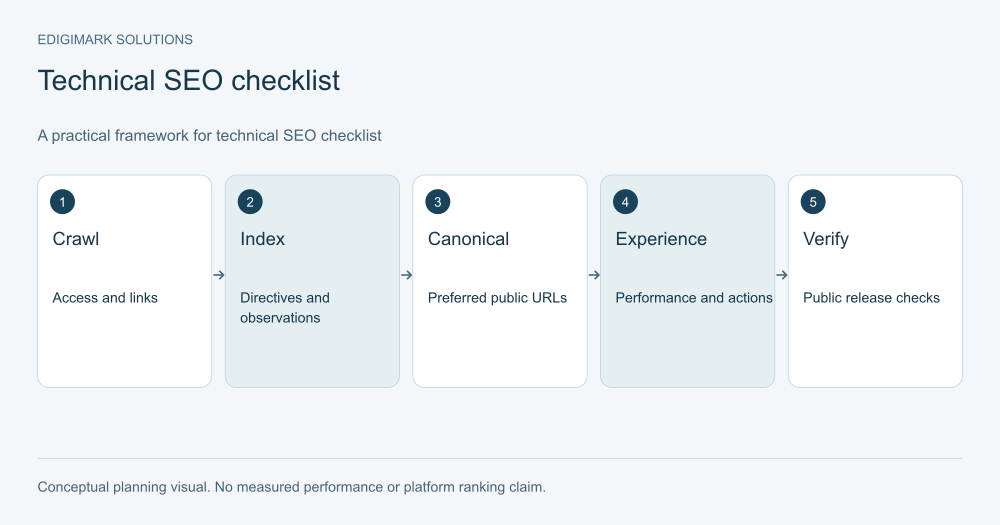
Conceptual framework for technical SEO checklist; examples are illustrative.
What should a crawlability audit cover first?
Choose the homepage, important service pages, a current article and any page with a different template or rendering behavior. Add known problem URLs and recent changes. This selection gives the audit a commercial purpose while exposing shared technical issues.
Keep the intended public URL and its final destination in the same record. If a page redirects, determine whether the destination still answers the original task. If it returns an error, check whether important links still point to it. Prioritize failures that obstruct customers before investigating low-impact archives.
Gather the evidence before changing anything. A response, screenshot or inspection result can show whether a problem comes from a template, an individual field or an earlier migration. Without that record, the team may fix one symptom while leaving the underlying cause unclear.
Can crawlers access the important resources?
Review robots.txt deliberately
Inspect the rules for the relevant crawlers and ask why each restriction exists. Private areas and search resources have different purposes. Google’s robots documentation explains that robots.txt is a crawl control with limitations. Do not use it as a substitute for privacy protection or assume a blocked URL can never appear in results.
Check assets as well as page paths when diagnosing rendering. A page can load for a logged-in administrator while behaving differently for an unauthenticated visitor. Use the public context that the site is meant to serve, and involve the website owner when access depends on security or edge rules.
Follow actual internal links
Start from a page a visitor can reasonably find and navigate to the resource. Inspect menus, article links and hub pages. A URL that exists in a spreadsheet but has no useful incoming links may need architectural attention.
Check that link targets are real URLs rather than controls whose only behavior depends on an unavailable script. Include mobile navigation, where a different component may be used. A desktop menu test alone can miss the entry path most customers see.
Confirm successful page responses
Open the intended URLs and check the actual content. A successful response can still display an empty state or a message saying the resource is missing. Conversely, an error page may show a convincing template while using the wrong response behavior.
Record the result with the page’s role. A failure on a core service page should usually outrank a problem on an obsolete tag archive. Avoid treating every URL in a crawl as equally important.
How do you diagnose indexing issues?
First distinguish “published” from “eligible” and “indexed.” Publishing is your website’s event. Eligibility depends on the page and platform requirements. Indexing is an observed search-engine state. Those stages should not be collapsed into a single checkbox.
Inspect robots meta tags, relevant HTTP headers and intended canonical annotations. Look for production pages carrying staging restrictions. Also check whether an old template or plugin outputs a directive that contradicts the page-level field.
Use Google’s URL Inspection documentation to understand the available observations for a specific URL. Record the date and distinguish stored indexing information from a live test. A live test can help diagnose access; it does not promise later indexing or ranking.
When a page is missing, investigate the specific explanation rather than repeatedly requesting indexing. Does the content exist at the public destination? Is it linked? Does another URL duplicate it? Is there a technical or quality issue? Repetition cannot replace a diagnosis.
What should you check about canonical tags?
A canonical identifies the preferred version of a duplicate or very similar resource. It should not become a generic field pointing every page at the homepage. Google’s canonical guidance explains the relevant signals and consistency considerations.
For a headless site, inspect the public head. Confirm that a value stored in the CMS reaches the frontend and points to the intended public URL. Keep CMS administration paths and public article paths distinct. A correct saved field can still be ignored or rewritten by a template.
Compare the canonical with internal links, redirects and sitemap entries. Investigate contradictions, such as a page linking internally to one host while declaring another host and redirecting again. Consistency makes your intention easier to maintain even though a search engine can still choose its own canonical.
Check edge cases: pagination, filtered resources, alternate formats and translated content. Do not apply a blanket canonical rule to pages with genuinely distinct purposes. The website owner needs to understand the content model before deciding the correct behavior.
How should redirects and missing pages be reviewed?
Maintain a list of intentionally changed URLs with their replacement resources. Choose destinations that preserve the user’s task. An old implementation guide should not lead to an unrelated promotional page merely because it is available.
Inspect redirect chains and loops. A chain may come from multiple migrations or conflicting host rules. Fix the cause with the website team, then verify important incoming links and final destinations. Do not remove rules blindly without understanding which legacy links depend on them.
For a missing page with no suitable replacement, determine the appropriate response instead of inventing a redirect. The decision depends on whether the resource should return, whether a genuinely relevant alternative exists and what the site is meant to communicate.
A useful redirect record contains the old URL, intended destination, reason, owner and verification date. This prevents future teams from recreating deprecated paths or adding contradictory rules.
What belongs in sitemap and URL hygiene checks?
Inspect a representative set of sitemap entries. They should match the resources your site intends to maintain and expose. Identify missing important pages, unexpected duplicates, obsolete paths and URLs that resolve through unnecessary redirects.
Check the actual generated sitemap after content imports and releases. A sitemap plugin can continue functioning while the frontend’s route pattern changes. The existence of a sitemap does not establish that its contents are correct.
Review parameters and archives according to their purpose. A filtered resource that helps customers may deserve a different treatment from a redundant sort order. Avoid rules based solely on the presence of a question mark or a particular directory name.
Keep a URL inventory for commercially important resources. It does not need to cover every possible parameter combination to be useful. Start with the pages the business depends on and expand when the technical model warrants it.
How do you check JavaScript and headless content delivery?
Compare the intended article or service content with what appears on the public page. Inspect headings, body text, links and important assets after loading. If content depends on JavaScript, work with developers to understand what an unauthenticated visitor receives.
Metadata deserves a separate check. Inspect the delivered title, description, canonical and relevant social fields. Confirm that the frontend consumes the correct source and does not retain a fallback from a previous post or deployment.
For example, a hypothetical CMS may store a public article canonical while a frontend constructs a CMS-host URL automatically. The audit should capture that discrepancy and give the developer the expected public destination. The acceptance test should inspect the public response after the correction.
Bring these findings to web development with affected URLs and observable criteria. “Fix SEO” is too vague for a reliable handoff; “these three public article responses must deliver the saved title and canonical” describes a testable outcome.
How should Core Web Vitals be used?
Google’s Core Web Vitals documentation explains the role of these measures in the page experience. Use performance data to find friction, while recognizing that strong scores do not guarantee ranking success.
Distinguish field observations from a controlled lab test. A test under one device and network condition can identify a problem, but it may not represent all visitors. Label the source and date so later comparisons use compatible conditions.
Investigate the visible cause: oversized assets, expensive scripts, delayed rendering or elements that shift during use. Select changes that improve the task the page supports. A visitor trying to submit an inquiry needs responsive controls, not only a fast initial screenshot.
Test representative templates and important exceptions. A homepage optimized in isolation cannot prove an article with several images or a service page with a complex form performs well. Prioritize the pages and interactions that matter commercially.
What page experience checks should accompany performance?
Read the main content on mobile. Check table overflow, diagram labels, tap targets and overlay behavior. A technically fast page can still be difficult to understand when a comparison table becomes tiny or a banner covers the central answer.
Test the action the page invites. Complete a request, follow a scheduling link or open the next resource. Confirm receipt through the approved process where a form is involved. A success message is not evidence that the business received the inquiry.
Use conversion rate optimization to investigate friction that lies beyond technical loading. Keep its role distinct from ranking claims. A clearer inquiry journey can be commercially valuable even when its precise relationship to search selection is unknown.
What does a useful technical SEO issue record look like?
Use a short format: affected URL, observed problem, evidence, expected behavior, business impact, owner and verification. Add dependencies and whether the issue appears on a shared template. This makes implementation more efficient than handing over a list of tool warnings.
A hypothetical record might say that a public service page returns the right content but outputs a canonical for an old path. The expected behavior is one intended public canonical consistent with the route plan. The developer checks the template; the coordinator verifies the final response and updates the audit status.
Use clear statuses: observed, assigned, implemented and verified. Keep “implemented” separate from “verified.” This prevents a completed development ticket from being mistaken for successful delivery on the live website.
How do you prioritize the technical SEO checklist?
Address failures that prevent an important page or interaction from functioning. Next, resolve contradictions that misrepresent the resource or create maintenance problems. Then tackle improvements with clear user benefit. Avoid letting a long list of minor warnings obscure a broken commercial journey.
Consider dependencies. An analytics issue may need correction before you judge conversion performance. A canonical rule may need a route decision before implementation. A content template change may affect several page types and require a broader release check.
Make the plan proportionate to the site. A small service website needs reliable essentials and a maintainable process. A large frequently updated resource may need deeper automation and crawl analysis. The checklist is a framework to adapt, not a reason to impose enterprise complexity on every business.
What should happen after a fix?
Repeat the relevant public check and preserve the result. Inspect adjacent examples when a shared template changed. Confirm that the change did not introduce contradictory metadata or break a customer action.
Where measurement is needed, use data analytics to keep event definitions and source records consistent. A deployment can alter event delivery as well as page rendering, so a traffic chart may need a data-quality review before interpretation.
Schedule maintenance around actual triggers: migrations, content imports, plugin changes, template releases and service updates. A quarterly audit is useful context, but a major release should not wait for the next calendar review.
How do you investigate a release-related problem?
Imagine a hypothetical business noticing fewer inquiries after a frontend release. Begin with the actual inquiry path rather than assuming a ranking problem. Check whether the form loads, accepts valid input, submits once and reaches the receiving system. Compare the expected event with the recorded event to distinguish interaction failure from reporting failure.
Next, inspect representative landing pages. Did the release change routes, rendering, titles or canonical annotations? Are old campaign and article links still reaching a useful destination? Keep the release date beside the observations. A coincident performance change is a lead for investigation, not proof that one field caused it.
If the problem lies in a shared component, choose a broader verification set after correction. Include pages with different content types and actions. If the issue is confined to one page’s saved field, a narrower check may be proportionate. The scope should follow the cause rather than a fixed testing ritual.
Preserve a short incident record with the observed behavior, cause, correction and verification. That record helps the team prevent recurrence during the next release. It also makes the performance report easier to interpret because a period with broken event delivery should not be compared uncritically with a healthy period.
What should a routine technical review leave behind?
Leave a current URL inventory, a prioritized issue list and a small set of release checks. Make the records understandable to someone who did not run the audit. Include the tool or method used, the date and the exact resource involved.
Keep unresolved decisions separate from implementation defects. A team may first need to decide whether two resources serve the same task before a developer can choose a canonical or redirect behavior. Flag that dependency instead of issuing a technical instruction built on an assumption.
A maintained review process should reduce repeated diagnosis. The website team should know which templates to inspect after changes, editors should know how metadata is delivered and analysts should know when event definitions changed. Those shared records create continuity even when individual staff or partners change.
Frequently asked questions
Does a technical SEO checklist guarantee rankings?
No. It can identify and remove obstacles, verify intended delivery and improve usability. Ranking also depends on relevance and other considerations. Report what was checked rather than claiming a guaranteed search outcome.
Should we fix every warning from a crawler?
Assess relevance, impact and evidence first. Some warnings may describe intentional behavior or low-priority URLs. Turn meaningful findings into a backlog with owners instead of chasing every warning equally.
Are canonical tags the same as redirects?
No. A redirect sends a visitor to another destination, while a canonical annotation identifies a preferred resource for duplicate or similar content. Choose the mechanism that fits the actual URL and content situation.
How often should technical SEO be checked?
Check affected pages after releases and significant URL changes, then maintain a regular review suited to your site. Frequently changing sites need a different cadence from stable service websites.
Can a CMS SEO plugin complete the audit?
A plugin can help populate or check fields, but the public page still needs verification. This is especially important when a separate frontend controls rendering, metadata and routes.
Turn technical observations into working pages
Begin with your core pages, collect evidence and assign concrete corrections. Edigimark’s digital marketing services can connect that review with wider search priorities. Contact the team with your URL set, platform and recent changes to define a practical audit scope.