SEO ranking factors are the signals and systems search engines use to assess and order results, but an optimization plan also includes practices that support discovery, clarity and conversion. This guide gives you 100 practical checks across technical delivery, content, authority and user experience. It is a business review framework, not an official list of 100 Google ranking factors.
That distinction matters. A page title, a working inquiry form and a genuine case study can all deserve attention, but they do not have identical roles in ranking. Treating every useful practice as a confirmed signal encourages mechanical optimization and makes it difficult to decide what the website actually needs.

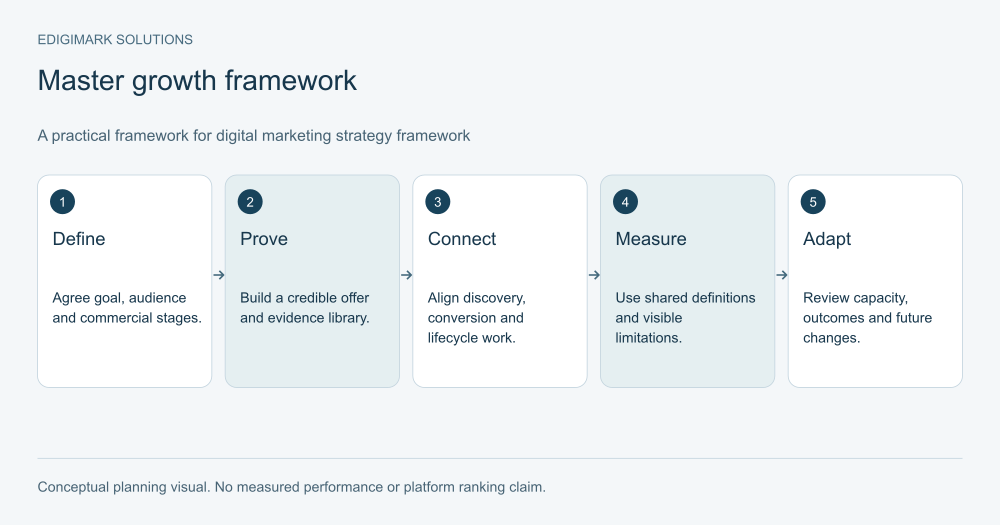
Conceptual framework for SEO ranking factors; examples are illustrative.
How should you interpret Google ranking signals?
Google’s ranking systems guide describes multiple systems, including language understanding, link analysis and relevance. It does not publish a universal checklist that guarantees first position. Assess your pages against useful customer tasks, technical delivery and reliable evidence rather than claiming to reverse-engineer a private formula.
Use three labels in your own audit: documented platform behavior, supporting practice and business outcome. For example, a technical eligibility requirement has a different status from a recommended editorial workflow. Qualification and revenue are outcomes you measure; they are not page fields you can optimize directly.
Page experience also needs careful interpretation. Google’s current guidance identifies Core Web Vitals within its ranking systems while warning that strong scores do not guarantee top rankings. A broader usable experience remains a sensible customer objective without turning every usability improvement into an asserted direct factor.
How do you use the 100-check framework?
Start with a representative service page, a useful guide and a template with meaningful technical differences. For each check, record the current observation, evidence, owner and next action. Use “unknown” for anything not yet inspected. An assumption should not become a green cell because the team expects the website to behave correctly.
Work through the sections in order when dependencies require it. A content improvement cannot help visitors if the public page is broken. Better reporting cannot explain inquiry quality if qualification is undefined. Other tasks can run in parallel when their owners and acceptance criteria are clear.
Technical SEO factors: access and indexing
1. Public response
Open the intended URL and confirm that it serves the actual page rather than an empty template, unrelated redirect or disguised error.
2. Important URLs
Maintain an inventory of commercially important pages. Technical work needs priorities; a crawl report alone cannot decide which failures matter to the business.
3. Robots rules
Review crawler access against the company’s intentions. Keep search, private content and other crawler purposes distinct rather than applying one unexplained blanket rule.
4. Page directives
Check robots meta tags and response headers on production pages. A directive saved in a CMS may differ from the public frontend’s output.
5. Indexing observations
Inspect important pages with appropriate first-party tools. Record the date and observed state; successful publication does not establish that a search engine indexed the page.
6. Canonical consistency
Confirm each selected page identifies the intended public resource. Investigate contradictions between canonical annotations, redirects, internal links and sitemap entries.
7. Redirect destination
Follow redirects to their final destination. An old article should reach a genuinely relevant resource rather than the homepage solely for convenience.
8. Broken pages
Prioritize missing resources that customers or navigation still reference. Restore useful content or choose a relevant destination before marking the issue resolved.
9. Rendered content
Check that important text and links appear in the delivered page. Review framework or JavaScript dependencies with the website team when the initial response is incomplete.
10. Sitemap accuracy
Inspect representative sitemap URLs for live, intended destinations. Automated generation should be checked after migrations, template changes and large content imports.
Website structure and internal navigation
11. Page purpose
Assign one primary customer task to each maintained resource. Overlapping articles should have distinguishable decisions, audiences or evidence.
12. Navigation hierarchy
Organize important services so people can predict where to find them. A menu should reflect the offer, not only internal department names.
13. Contextual links
Connect explanations with the next useful resource. The reason for a link should be clear from the surrounding sentence.
14. Anchor wording
Use concise descriptions of the destination. Repeating a commercial phrase across every link can reduce readability and obscure distinctions.
15. Orphan review
Find useful pages with no meaningful incoming internal links. Decide where they belong instead of adding them randomly to unrelated articles.
16. Hub coverage
Use a hub when readers need an overview and several deeper resources. The hub should guide decisions rather than merely list every URL.
17. Breadcrumb clarity
Where breadcrumbs are used, check that the labels and destinations reflect a real hierarchy and remain useful on small screens.
18. Duplicate destinations
Inspect repeated links that lead to different versions of the same resource. Keep navigation consistent with your maintained public URL plan.
19. Link maintenance
Check contextual links when a target page changes purpose. A technically working link can still become misleading after an editorial update.
20. Architecture ownership
Assign responsibility for navigation and linking rules. Without an owner, new pages can accumulate as disconnected items even when each article is well written.
Page relevance and search intent
21. Audience definition
Name the audience and decision before selecting a topic. A broad keyword can attract several groups with very different needs.
22. Intent observation
Review current results and customer questions to understand the task. Treat a tool’s intent label as a hypothesis that requires inspection.
23. Page type
Choose a service page, guide, comparison or troubleshooting resource according to the task. A generic blog article cannot satisfy every intent.
24. Direct opening
Answer the central question early. Include important conditions next to the answer so a quick reader does not leave with a misleading impression.
25. Scope boundary
Explain what the resource covers and what requires another page. Boundaries keep a focused article from becoming an unfocused encyclopedia.
26. Useful terminology
Define terms the audience needs to make the decision. Do not add technical jargon solely because competing articles contain it.
27. Task completion
Ask whether readers can do what the page promises after reading it. Identify missing prerequisites, examples or next steps before adding more words.
28. Relevant alternatives
Discuss other approaches when the decision warrants them. A useful recommendation explains where an alternative may be a better fit.
29. Commercial connection
Connect educational content with a relevant offer where appropriate. Preserve the article’s usefulness for visitors who are still learning.
30. Overlap control
Review whether another page already owns the same task. Consolidation or clearer scope can be more useful than another closely related article.
Content quality signals and evidence
31. Verified facts
Check important product, platform and service claims against current evidence. Remove assertions that no responsible person can substantiate.
32. Original contribution
Add an explanation, decision model or approved observation that helps your audience. Rewording existing summaries creates little reason to choose your page.
33. Worked examples
Show how a framework applies to a specific situation. Label hypothetical examples and identify the assumptions that change the outcome.
34. Source attribution
Place a relevant source near the claim it supports. A long source list cannot repair an unsupported assertion in the opening.
35. Evidence scope
Describe what a case result or study actually measured. Do not turn another company’s outcome into a forecast for your reader.
36. Expert review
Ask the owner of a technical fact to check it. Record the review without inventing credentials or implying involvement that did not occur.
37. Method transparency
When publishing research, explain collection, dates, definitions and limitations. Readers need a basis for evaluating a chart or percentage.
38. Balanced conclusions
State uncertainty and exceptions where they matter. A persuasive headline should not conceal conditions that materially change the recommendation.
39. Editorial accuracy
Check names, links, units, labels and examples. Small contradictions can undermine an otherwise useful explanation and create avoidable customer questions.
40. Maintenance triggers
Identify changes that would make a page inaccurate. Product releases and service changes should prompt review before a scheduled annual update.
On-page descriptions and presentation
41. Descriptive title
Use a title that identifies the topic and useful promise. Avoid exaggerated claims or a number the article does not actually deliver.
42. Primary heading
Make the visible main heading consistent with the page’s purpose. Check the public template so an imported heading does not duplicate another H1.
43. Heading progression
Use headings that help readers follow the explanation. A hierarchy should reflect sections and subsections rather than visual size alone.
44. Meta description
Write an accurate summary that helps someone judge relevance. The field should not promise results or capabilities absent from the page.
45. Readable paragraphs
Break dense passages where the reasoning changes. Paragraph length should serve understanding rather than a mechanical rule applied to every page.
46. Useful lists
Use a list for genuinely parallel items or a sequence. Preserve connected prose when the relationship between ideas needs explanation.
47. Comparison tables
Choose consistent criteria for alternatives. Do not omit a competitor’s useful feature simply to make your preferred option look stronger.
48. Visual explanation
Use a diagram when it clarifies a process or relationship. Decorative images should not displace the answer or imply unsupported data.
49. Accurate alt text
Describe the image’s informative content. Avoid stuffing unrelated keywords into a description that should help someone understand the visual.
50. Public verification
After editing, inspect the actual title, summary, headings and assets. A saved administration field is not evidence of successful frontend delivery.
Page experience and conversion usability
51. Mobile layout
Read the page on a narrow screen. Check tables, diagrams and controls rather than assuming a responsive template handles every content type.
52. Loading experience
Identify delays that obstruct the reader’s task. Inspect representative pages with realistic conditions before deciding which assets to optimize.
53. Interaction response
Test navigation and form controls during loading and normal use. A page can appear attractive while responding poorly to the action it invites.
54. Layout stability
Watch for elements moving while you read or interact. Reserve appropriate space for assets when the website team identifies layout shifts.
55. Secure delivery
Confirm the intended secure public experience and investigate mixed or blocked resources. Do not equate a security label with overall site quality.
56. Main content visibility
Keep the central explanation easy to distinguish from promotions and related material. Readers should not need to hunt for the answer.
57. Overlay behavior
Check whether dialogs or banners block important content, especially on mobile. Review necessity and usability with the appropriate owner.
58. Form completion
Submit a test inquiry through the approved process and confirm receipt. A visible success message does not prove the request reached the team.
59. Action clarity
Explain what happens after a visitor takes the next step. Clear expectations reduce friction and help buyers choose the right inquiry path.
60. Accessibility review
Check keyboard navigation, labels and readable contrast. Accessibility improves the usable experience; do not reduce it to a supposed ranking shortcut.
Authority, identity and reputation
61. Business identity
Keep the public company name and relevant contact details consistent. Resolve contradictions that could confuse a customer evaluating your offer.
62. Service accuracy
Describe services you currently provide. Do not create an impression of specialist capabilities or geographic coverage that the company cannot deliver.
63. Author context
Provide accurate context about authors or reviewers where useful. A biography should represent actual involvement rather than decorative expertise claims.
64. Case permission
Check permission before publishing customer details or outcomes. Confidential project information should not become public merely because it improves a page.
65. Review integrity
Use genuine reviews and follow applicable platform rules. Do not manufacture testimonials, selectively invent ratings or misrepresent the source.
66. Relevant references
Seek useful editorial recognition through work worth discussing. Paid or manipulated links should not be presented as independent validation.
67. External accuracy
Review important public descriptions you can legitimately maintain. Correct outdated identity or service facts without impersonating independent commentary.
68. Evidence availability
Keep the basis of significant claims accessible to internal reviewers. A result that cannot be traced becomes difficult to maintain responsibly.
69. Trust friction
Identify contradictions between a blog, service page and proposal. Consistent information helps buyers understand the offer before they contact sales.
70. Reputation ownership
Assign an owner for feedback and factual corrections. A content calendar should include maintenance of important public information.
Structured data and information consistency
71. Applicable markup
Choose structured data that accurately describes the resource. Avoid adding types solely because a tool suggests they might create extra search space.
72. Visible agreement
Check that names, dates and claims in markup agree with visible content. Hidden unsupported assertions should not be introduced through schema fields.
73. Template conflicts
Inspect whether several systems output contradictory structured data. Resolve duplication with the website owner rather than adding another layer.
74. Article details
Confirm genuine publication and modification information where used. A date change should reflect a substantive update, not a cosmetic freshness tactic.
75. Organization facts
Use accurate organization details and identifiers. Structured data cannot substitute for a clear, trustworthy public business description.
76. Image delivery
Verify that images referenced in metadata load at the intended public URLs. An uploaded file may still be missing from the frontend.
77. Social preview
Inspect relevant sharing metadata and image behavior. This supports presentation when shared; do not label it a universal ranking factor.
78. Format validation
Use appropriate validation tools for the implemented format. A valid result checks requirements; it does not guarantee display or high ranking.
79. Current eligibility
Review current feature documentation before promising rich results. Platform support can change while a plugin still offers the field.
80. Metadata ownership
Document which system produces each public field. This is particularly useful for headless sites where CMS and frontend responsibilities differ.
Measurement and diagnosis
81. Metric definitions
Define visits, leads, qualified opportunities and revenue separately. Combining them conceals where the customer journey succeeds or breaks down.
82. Relevant queries
Review the queries and landing pages behind aggregate traffic. A rising total can hide a shift toward an unsuitable audience.
83. Page grouping
Group content by purpose before assessing performance. A support guide and a commercial service page need different success criteria.
84. Qualified demand
Connect inquiries with sales qualification where authorized. More forms are not automatically more valuable when fit or buying readiness deteriorates.
85. Attribution limits
State what the chosen model can establish. A last-click label cannot reconstruct every influence on a long buying process.
86. Change log
Record releases, campaigns and methodology changes beside performance data. Trends are easier to interpret when important context remains visible.
87. Baseline evidence
Keep a pre-change record before substantial edits. Without a baseline, later observations can be mistaken for an improvement caused by the update.
88. Comparable periods
Check seasonality, audience mix and cohort maturity before comparing numbers. Recent opportunities have had less time to progress than older ones.
89. Data quality
Inspect missing events, duplicate submissions and classification rules. Reporting problems deserve correction before the team draws strategic conclusions.
90. Actionable review
End performance reviews with a specific next decision. A dashboard should guide improvements rather than merely produce another set of charts.
Your 2027 maintenance and investment plan
91. Current evidence
Treat 2027 as a planning horizon. Ground present recommendations in current documentation and label forecasts instead of reporting future outcomes as facts.
92. Priority rationale
Rank work by customer impact and dependencies. A missing decorative image and an inaccurate service claim should not receive identical attention.
93. Named owners
Assign developers, editors, subject experts and analysts their respective tasks. One coordinator should maintain the combined backlog and status.
94. Release checks
Verify affected public pages after changes. Shared template updates may justify broader checks than a single isolated factual correction.
95. Review triggers
Connect content maintenance with product and service changes. Waiting for an annual refresh can leave important answers outdated for months.
96. Budget realism
Include research, review, design, development and maintenance in the plan. Writing time alone rarely represents the full cost of a reliable asset.
97. Experiment scope
Test a clear hypothesis on a manageable page set. Changing every variable at once makes a result difficult to interpret.
98. Decision records
Document why a page was improved, merged or retired. Future teams should be able to understand the choice without repeating the entire audit.
99. Tool judgment
Use tool checks to identify omissions, then apply editorial judgment. A score cannot determine whether the page solves the right customer problem.
100. Continuous usefulness
Keep the program centered on accurate, relevant and usable resources. Evaluate new tactics by their evidence and customer benefit before expanding investment.
What should the final audit deliver?
The output should be a prioritized backlog with observable acceptance criteria. “Improve content quality” is too vague. “Add verified prerequisites, show a labeled worked example and correct the unsupported compatibility claim” describes work an editor and subject owner can complete.
For a hypothetical service site, the highest-priority finding might be a broken inquiry path on a commercially important page. The next might be conflicting service scope, then weak navigation to an accurate implementation guide. This order reflects the customer journey; it is not a claim that the form itself is a ranking signal.
Bring technical fixes to web development, measurement definitions to data analytics and inquiry friction to conversion rate optimization. A clear handoff connects each discipline with the problem it can verify.
Frequently asked questions
Are these 100 confirmed SEO ranking factors?
No. They are 100 checks combining documented search considerations, supporting practices and business measurement. The article deliberately separates a useful optimization task from a claim about an internal ranking signal.
Should we complete every check before publishing?
Use relevance and risk to decide. Accurate information and functioning delivery are essential, while some enhancements can follow. Record anything intentionally deferred with an owner and reason rather than implying the whole review has passed.
Is content length a ranking factor we should target?
Do not select length as a substitute for answering the task. A complex implementation decision may need depth; a narrow definition may need little space. Edit for usefulness and evidence rather than stretching every page to a fixed total.
Can a high plugin score prove we will rank?
No. A plugin evaluates its own checks. It cannot guarantee search selection, relevance to every query or commercial outcomes. Use it to catch omissions while retaining editorial and technical judgment.
How should we prepare this plan for 2027?
Prioritize durable improvements now, track current platform documentation and review assumptions as new evidence appears. Do not label predictions or proposed features as established future facts.
Choose the checks that remove your next constraint
The useful result is a clearer, more reliable website and an accountable improvement process. Edigimark’s digital marketing services can help connect the review with content and acquisition priorities. Contact the team with your core pages and current business goal to scope the next work.