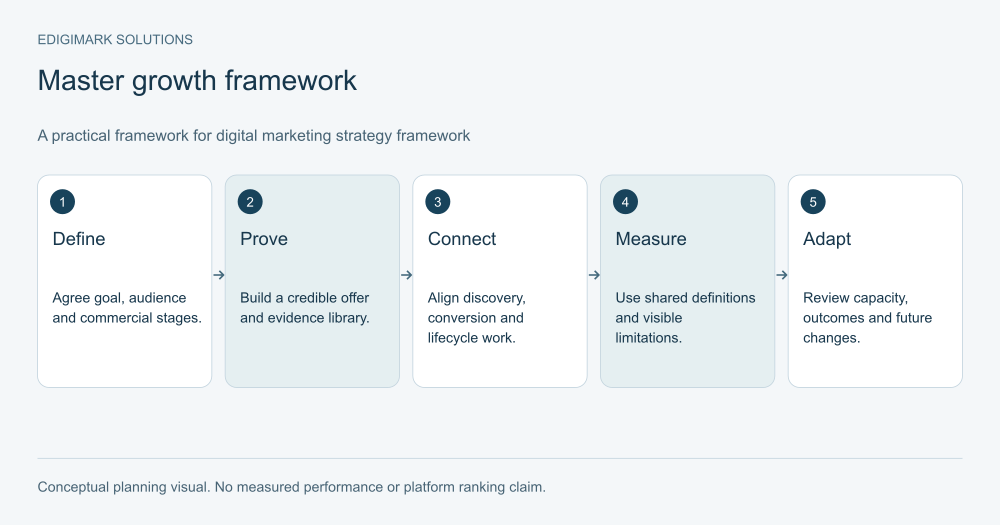

SEO for small businesses is a practical process for making your services or products easier to discover, understand and choose through search. A useful plan begins with an accurate website, a small set of commercially relevant pages, local information where applicable and measurement of real enquiries or purchases. The 90-day SEO roadmap below is a schedule for implementation and learning, not a promise that rankings or revenue will reach a particular level within three months.
An established small business already holds useful knowledge: the questions customers ask, the jobs it can deliver, the areas it serves and the reasons people choose it. SEO turns that knowledge into an accessible website. The challenge is to do the important work consistently without creating a second full-time job for the owner.

What should SEO for small businesses achieve?
Choose one primary commercial objective for the first phase. A local repair company might want more appropriate service enquiries. A specialist retailer might want more purchases from relevant category pages. A consultancy might want prospective clients to understand the scope of its work before booking a conversation.
Translate the objective into a measurable action and a quality definition. “More leads” is incomplete if the company cannot serve most of them. Record the service required, location where relevant and whether the enquiry progressed. For a store, distinguish orders from cancelled or returned purchases.
List the constraints too: available staff, website access, service capacity, seasonality and the information needed from suppliers or technical colleagues. A realistic plan fits those constraints. It should not require the owner to publish daily or rebuild a functioning website without evidence of a problem.
Our digital marketing service can help connect those choices with the wider acquisition plan, particularly when search is one of several routes customers use.
Days 1–15: How does a small business SEO plan establish a baseline?
Start with the pages that explain what you sell. Open them on a phone and a desktop. Check that the text is accurate, the navigation works, phone numbers and forms are usable, and the next step is clear. Submit a test enquiry and confirm that the right person receives it.
Inspect your search setup. Verify access to Search Console and your analytics system. Check that the live website does not carry a staging noindex directive, that important URLs work and that the sitemap uses the preferred public addresses. Where the site has duplicate variants, align internal links and canonical preferences rather than leaving different parts of the site pointing in different directions.
Capture a baseline before making broad changes: current indexed pages, relevant search queries, enquiries, purchases and known technical issues. Do not turn the baseline into a contest over one score. It is a record that helps explain future changes.
Google’s SEO Starter Guide describes the shared basics of understandable content and accessible site structure. Use those principles to identify blockers, then seek technical help when the problem exceeds the team’s access or expertise.
What belongs in a beginner SEO checklist?
A beginner SEO checklist should prioritise actions that make the website usable and understandable:
- Confirm the business name, contact information and service scope are accurate.
- Give each main service or product category a clear destination.
- Write a descriptive title and main heading for each important page.
- Make important pages reachable through navigation or useful contextual links.
- Check that production pages load and allow intended indexing.
- Test forms, booking links, phone actions and checkout paths.
- Add helpful image descriptions where the image communicates meaning.
- Establish a record of meaningful enquiries or orders.
These checks do not guarantee search visibility. They prevent common issues that can make a good offer difficult to find or choose. Work through the list using a real customer task, such as requesting the relevant service, rather than inspecting the homepage alone.
When a technical change is required, ask the developer to explain its purpose, the affected pages and how it will be verified. Keep a simple change log so later performance discussions have context.
Days 16–30: How should small business keyword research work?
Small business keyword research starts with your actual services, products and customer language. Collect questions from enquiries, calls and support messages. Group them by the decision being made: finding a provider, comparing an option, understanding a requirement or completing a task.
Add geography only where it reflects the business. A plumber serving a defined area may need location context; a specialist selling nationwide may need delivery information instead. Do not publish a page for every town if the business cannot provide a useful, distinct explanation for each location.
Inspect search results for the main candidate queries. Note whether people see local listings, product categories, service pages or guides. Use that observation to choose a suitable page type. Validate demand with reliable market-specific tools where available, but avoid interpreting an estimated volume as an exact forecast of visits.
Create a keyword-to-page map. One page can answer several closely related phrases. Assigning a separate page to every variation often produces duplication and divides maintenance effort.
Keep the initial map focused on the areas where the business can provide strong information and fulfil demand. A fashionable topic outside the service scope is a weak priority even if its search volume looks attractive.
How should a small business SEO plan connect the local profile and website?
If the business is eligible for a Google Business Profile, maintain accurate categories, contact details, opening hours and relevant service information. Make sure the website confirms the same practical facts. A profile that says the business is open while the website says it is closed creates avoidable uncertainty.
Google’s local ranking guidance identifies relevance, distance and prominence as principal considerations. A business can improve the accuracy and usefulness of its information; it cannot simply choose a different distance from the searcher or pay for a better local ranking.
Ask for genuine customer feedback through an appropriate process and respond constructively. Do not fabricate reviews, offer misleading incentives or promise that a review count will secure a particular position.
Local pages should explain service availability, relevant conditions and how to enquire. For a hypothetical cleaning company, useful differences might include the types of properties served, access requirements and booking arrangements in a particular area. Merely swapping the location name in identical paragraphs does not add that information.
Days 31–45: Which pages should a small business SEO plan improve first?
Prioritise the pages connected to your most relevant services or products. Explain who the offer suits, what it includes, what it excludes and what the customer should do next. Replace vague claims with practical details.
For a service page, a prospect may need to know the assessment process, required information, delivery area, typical project stages and how a quote is prepared. For a product category, they may need to understand compatibility, dimensions, availability and the differences between options.
Include real proof where it exists. Use genuine testimonials with appropriate permission, accurate project examples and photographs that represent the work honestly. If you use an illustration to explain a process, label it accordingly.
Make the action match the offer. “Request a quote” should lead to a quote process; “Book a consultation” should explain what the consultation involves. A form should ask for information the team actually needs, with helpful labels and clear error messages.
These changes often involve both content and user experience. Conversion rate optimization helps examine whether the page supports the intended decision after the visitor arrives.
Days 46–60: Which content belongs in a 90-day SEO roadmap?
Choose questions that customers ask repeatedly and that the commercial pages do not answer well. A guide to preparing for installation, a comparison of suitable options or a maintenance explanation can be more useful than a general article about the industry.
Write from the business’s actual knowledge. Explain the conditions under which advice changes. If a recommendation depends on the property, equipment or customer circumstances, say so rather than giving a universal answer.
Use a direct answer near the beginning, descriptive section headings and examples that help the reader apply the information. Link to the appropriate service or product where it provides a sensible next step. Do not force a sales pitch into every paragraph.
Set a review date based on how quickly the information changes. Pricing, availability and regulations may need more frequent checking than stable maintenance principles. When the subject has legal, medical or financial consequences, obtain suitable expert review rather than relying on generic marketing content.
Google’s helpful content guidance supports a focus on useful material for readers. Your customer knowledge is an advantage when you explain it clearly and accurately.
Days 61–75: How does a 90-day SEO roadmap connect the pages?
Review the journey from an informational page to an appropriate commercial destination. A preparation guide should link to the relevant service. A product explanation should help readers reach the correct category or specification. Commercial pages can link back to guides that address important questions.
Use descriptive link text. “See our installation process” is clearer than “Click here.” Avoid linking every repeated keyword; a link should help the reader navigate.
Check the main menu and footer for outdated destinations. Look for pages that exist but cannot be reached naturally from the rest of the site. Ask someone unfamiliar with the business to find a service and submit an enquiry. Their difficulties can reveal navigation assumptions the owner no longer notices.
If restructuring is necessary, involve web development to preserve working URLs and implement appropriate redirects. Changing every URL to look tidier can introduce risk without a clear benefit.
Days 76–90: What should a 90-day SEO roadmap review examine?
Compare the baseline with the current state, allowing for seasonality and the time since each change. Confirm that repaired technical issues stayed fixed and that new or revised pages are discoverable where intended.
Review the queries bringing impressions and visits. Do they match the audience and offer? Look at enquiries or purchases alongside traffic. If visits increased but suitability declined, revisit the page’s intent and messaging before celebrating the result.
Record customer feedback. Did prospects arrive better informed? Did the team answer fewer repetitive questions? Did the form collect useful information without creating unnecessary friction? These observations complement analytics even when the business has modest traffic.
Choose the next phase from the evidence. It might involve improving a promising page, answering a new customer question, repairing a technical issue or leaving the plan unchanged until more data is available. A review should produce decisions, not just a screenshot of rankings.
Data analytics support can make the reporting clearer when information is spread across forms, calls, orders and separate tools.
What should monthly SEO for small businesses include after the first phase?
Maintain a short routine: verify the website’s main actions, review relevant search changes, check important page accuracy and discuss enquiry quality with the team. Assign an owner to each issue rather than letting it remain in a report indefinitely.
Publish when there is a useful question to answer or a material gap to fill. A fixed article quota can help scheduling, but it should not override quality or maintenance. Updating a service explanation after the offer changes can matter more than adding another broad blog post.
Track work and outcomes separately. “Published three guides” describes activity. “Received relevant enquiries from two of those guides” describes an observed outcome. Keep the distinction so the team can judge whether the effort supports the business.
As the site grows, periodically consolidate overlapping pages and review the architecture. The initial plan should become more informed, not merely larger.
How should SEO for small businesses handle limited time or budget?
Protect the commercial foundation first. An accurate service page and a working enquiry route deserve attention before a large editorial calendar. Choose a few tasks the team can complete and maintain.
Use external help for gaps that have a clear purpose. A technical audit should lead to verified fixes. A content engagement should produce accurate pages with a defined audience. A reporting project should answer a decision the business actually needs to make.
Ask prospective suppliers to explain their priorities and assumptions. Be cautious of guaranteed rankings, undisclosed link schemes and reports that show activity without commercial context. Good work can be described in concrete terms without promising outcomes the supplier cannot control.
The first 90 days should leave the business with a more useful website and a clearer understanding of search demand. Discuss a manageable plan with Edigimark if you need help deciding which tasks belong first.
What should a monthly small business SEO plan task sheet contain?
Use one row per action, with the affected page, the reason for the change, the owner and the verification needed. For a broken form, the verification is a successful submission received by the right person. For an improved service explanation, it includes checking accuracy and observing whether appropriate visitors can reach the next step.
Add a dependency column when another person must provide information. A page waiting for confirmed service terms should not be published as though those terms are settled. Mark completed work separately from work whose effect is still being observed.
This task sheet keeps the plan useful when the owner has limited time. It also creates a clear conversation with an external supplier: which problem was addressed, which evidence confirms completion and which decision belongs next. A long list of proposed optimisations is less helpful than a short list of owned, verified actions.
Frequently asked questions
Is 90 days enough to see SEO results?
It can be enough to complete important work and observe early signals, but meaningful visibility and revenue depend on the site, market and changes. Treat the schedule as an implementation roadmap. Do not use it as a guaranteed deadline for ranking a particular keyword.
Does every small business need local SEO?
No. Local information matters when location influences customer choice or service availability. A business selling across a wider market may focus more on product, category or specialist service searches. Google Business Profile eligibility should be checked rather than assumed for every business model.
Should the owner write the content personally?
The owner or subject expert should contribute the knowledge and review factual accuracy. A writer can help organise and explain it. The important point is that the final page reflects the actual business, its limitations and the questions its customers need answered.
How many keywords should one page target?
There is no universal number. Group closely related queries around one useful purpose and make the page comprehensive enough for that purpose. Create a separate page when the search intent or offer is materially different, not merely because a tool shows another wording.
What is the most useful SEO report for a small business?
A short report connecting relevant visibility, enquiries or purchases, quality and completed improvements is usually more actionable than a long ranking list. Include issues requiring decisions and the next priority. The report should help the owner allocate time and budget with better information.