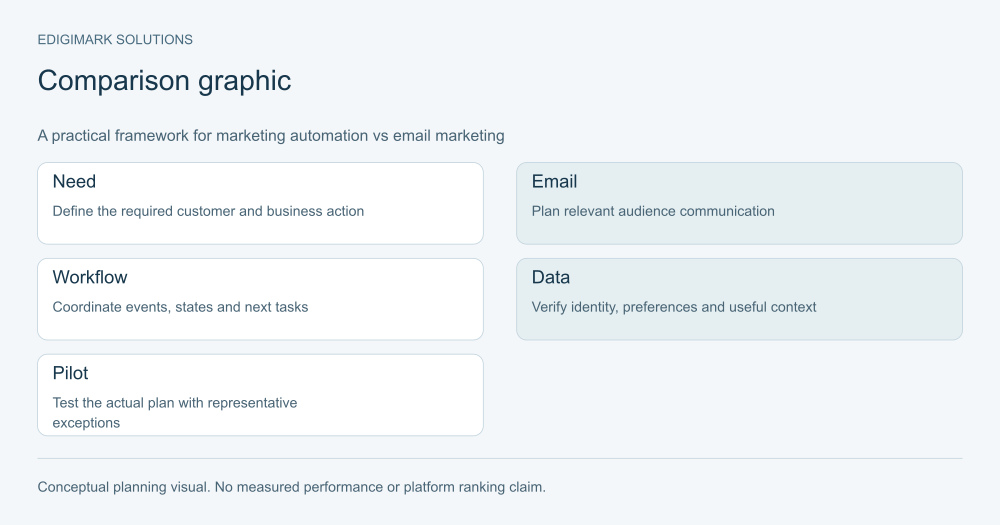
Marketing automation vs email marketing is mainly a question of scope and operating needs. Email marketing uses email to communicate with an eligible audience, through campaigns or automated messages. Marketing automation coordinates rules, records and actions across a wider process, which may include email, qualification, CRM updates and human handoffs. The capabilities overlap, so choose from actual requirements rather than product labels.
A business sending a useful newsletter may not need a complex lifecycle platform. A business trying to route enquiries, pause nurture during sales activity and return qualification feedback needs more than a send calendar. The right choice is the system and process the team can use and maintain reliably.
In this guide
- What does email marketing include?
- What does marketing automation add to the process?
- How do email campaigns vs workflows differ?
- What is behavioral automation and when is it useful?
- How should email segmentation be compared with lifecycle orchestration?
- When is an email marketing tool sufficient?
- When do lifecycle marketing tools become necessary?
- Can email marketing and marketing automation work together?
- What data matters when comparing marketing automation vs email marketing?
- How should CRM requirements influence the choice?
- What should an email or automation platform demonstration prove?
- How should total cost and maintenance be compared?
- How should email and automation success be measured?
- What should a migration from email campaigns to automation involve?
- How can a small team choose a practical starting point?
- What should the email and automation buying decision document contain?
- Frequently asked questions
What does email marketing include?
Email marketing includes audience management, relevant messages, segmentation, delivery and evaluation. A campaign may be scheduled for a defined group, while a welcome or resource response may be triggered automatically.
Do not assume email marketing means manually sending every message. Many email tools support automated paths. Mailchimp’s marketing automation flow guide describes triggers, rules and actions, illustrating the overlap between the categories.
The practical focus remains the communication and its audience. The team needs suitable content, appropriate preferences, dependable sending and a useful response route.
Digital marketing should connect email with an actual audience question. A sophisticated sending tool cannot make irrelevant content useful, and a large contact list does not establish a suitable campaign audience.
What does marketing automation add to the process?
Marketing automation can coordinate actions based on defined conditions, such as creating a task, updating a relationship state or selecting a nurture path. Email is one possible action within that wider process.
Salesforce’s automation guide describes workflow-based management of marketing processes and campaigns. The business needs to decide which events matter and what response is appropriate.
The wider scope introduces operational dependencies. A sales handoff needs accurate ownership and acceptance. A behavioural branch needs a reliable event. A lifecycle update needs a shared definition.
Marketing automation is useful when those dependencies form a repeatable, reviewable process. It should not be added merely to make a simple campaign appear more advanced.
How do email campaigns vs workflows differ?
A scheduled campaign usually begins with an audience and a planned communication. A workflow begins with an event or state, checks conditions and performs the relevant actions over time. Either can include segmentation and automation.
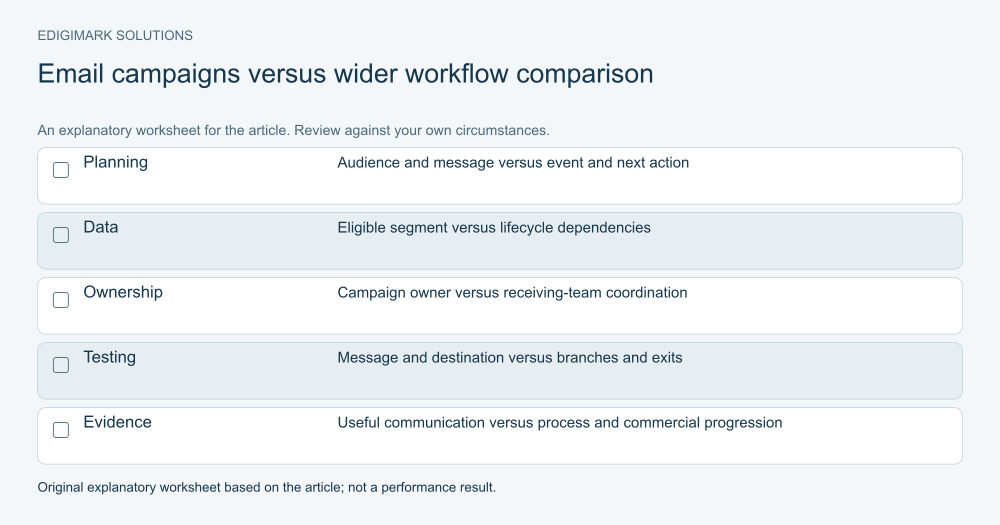
The comparison below describes common operating patterns, not a guarantee about any particular product:
| Decision | Email campaign focus | Wider automation focus |
|---|---|---|
| Main unit of planning | Audience and message | Event, record state and next action |
| Typical example | A relevant monthly update | A request-to-owner response process |
| Data needed | Eligible contact and useful segment | Identity, context, state and dependencies |
| Ownership | Campaign and reply owner | Workflow owner and receiving-team owner |
| Testing | Message, delivery and destination | Entry, branches, updates, exits and exceptions |
| Measurement | Useful communication outcomes | Process reliability and commercial progression |
A welcome email can sit between these patterns. It is automated communication, while a larger welcome process might also update a record, deliver onboarding tasks and involve an account owner.
What is behavioral automation and when is it useful?
Behavioral automation responds to a defined action or interaction. Its usefulness depends on whether the event has a reliable meaning and supports an appropriate next response.
An explicit resource request can justify delivery of that resource. A confirmed meeting can justify a relevant operational reminder. A page view may suggest an interest but does not establish a buying decision.
Verify the actual event available to the system. A click on a booking link is not the same as a completed booking. An email interaction should not automatically become a sales qualification label.
Start with signals that the team can explain. If a rule relies on an uncertain inference, identify that uncertainty and use a proportionate response. More tracked events do not necessarily produce a better customer experience.
How should email segmentation be compared with lifecycle orchestration?
Email segmentation groups eligible contacts for a relevant message. Segments may use explicit interests, relationship status or other information that changes the content’s usefulness.
Lifecycle orchestration considers a broader state and next action. It may coordinate communication with human activity, qualification and operational tasks. The same field can support both, but the requirements differ.
For a product update, segmentation might distinguish users of one product from the wider audience. For an enquiry workflow, the process may need to identify the current account owner, deliver the request and pause a competing introduction.
Avoid branches that do not change a useful action. Every separate path adds content and testing work. Choose distinctions because the audience’s question or the business response differs, not because a tool exposes another property.
When is an email marketing tool sufficient?
An email-focused tool may be sufficient when the main needs are relevant campaigns, a manageable audience and a small number of straightforward communication paths. The team still needs ownership and reliable data.
For example, a hypothetical training business might send course updates to people who chose that topic and deliver a welcome resource to new subscribers. If enrolment and customer support happen through a separate dependable process, a complex marketing workflow may add little immediate value.
Assess the current failures. If the problem is weak copy, outdated preferences or a broken destination, a larger platform does not resolve it automatically. Fix the communication process first.
Consider integration needs as they arise. An email tool can have useful connections, and broader automation tools can support simple campaigns. Verify the actual capability and maintenance requirement rather than treating the categories as mutually exclusive.
When do lifecycle marketing tools become necessary?
Wider lifecycle marketing tools become useful when coordinated states and actions are essential to the process. Examples include multi-step qualification, account-aware routing, human handoff and suppression during an active conversation.
The need should be observable. Leads arriving without context, inconsistent ownership and conflicting follow-up point to operating requirements. Translate those problems into specific fields, events and actions.
Make sure the business can maintain the process. Someone needs to review exceptions, update content, test changes and explain why a record entered a path. Without that capacity, more capability can create more uncertainty.
CRM integration becomes important when the relationship and outcome live in another system. The choice should include the quality of that connection, not only the number of workflow steps the interface can draw.
Can email marketing and marketing automation work together?
Yes. A business can use planned campaigns for broad relevant updates and workflows for specific processes. The requirement is coordination of audience, preferences, timing and current relationship state.
Create a clear view of overlapping communication. A person in a nurture workflow may also receive newsletters, event reminders and human sales follow-up. Individually sensible messages can become excessive in combination.
Agree which process has priority and how generic paths pause. A current discussion about a specific need may make another introductory campaign inappropriate. Expected operational messages can remain useful depending on their purpose.
Keep reply ownership visible. The contact should not have to understand which internal tool sent a message to obtain an appropriate response. The business needs a coherent relationship even when several systems participate.
What data matters when comparing marketing automation vs email marketing?
Both require accurate identities and appropriate communication preferences. Segmentation needs fields whose meaning is understood. Personalisation needs reliable values and graceful handling of missing information.
Wider automation adds dependencies on lifecycle states, ownership, activity events and integration outcomes. A wrong value can affect tasks and routing as well as message content.
Write field definitions and authority. An imported category should not silently replace a verified preference or sales decision. Unknown values need an intentional path rather than a misleading default.
Inspect representative records before buying more capability. A process that cannot distinguish a new lead, an existing customer and a duplicate identity may need data preparation before either option can function reliably.
How should CRM requirements influence the choice?
List the context the receiving team needs and the feedback marketing needs in return. Sales may need the original request and known constraints; marketing may need accepted ownership and disposition.
Check matching, mappings, direction, conflict rules and exception visibility for the actual connector. “Integrates with your CRM” is too broad to establish that the required process will work.
Test an existing identity and a changed state, not only creation of a new contact. Confirm that relationship ownership is preserved and that a human conversation can change campaign eligibility.
CRM integration should support a useful operating contract. The system should expose failures and preserve context rather than simply copy the largest possible set of fields.
What should an email or automation platform demonstration prove?
Prepare representative scenarios before the demonstration. Ask the vendor to show the current use case, a repeated entry, missing information, changed preferences and a receiving-team handoff where relevant.
Verify actual subscription access. A demonstration account may include features that your proposed plan does not. Confirm limits, permissions, integration needs and available support in current official product materials.
Ask how the team investigates a record’s path. The owner should be able to identify entry conditions, actions, failures and exits. A polished diagram is less helpful if nobody can explain an unexpected result.
Include the people who will maintain the system and receive its tasks. Their ability to use the process is part of product fit. A feature checklist cannot substitute for that operational review.
How should total cost and maintenance be compared?
Compare the actual subscription with implementation, integration, content, training and ongoing ownership. Avoid choosing from a headline price that excludes the work needed to make the process useful.
Use your expected records, sends, seats and required actions when checking the vendor’s current terms. Packaging can change, so verify the proposed plan instead of repeating an old price or capability claim.
Estimate maintenance honestly. A five-branch programme requires more assets and test cases than a simple campaign. That complexity can be justified when the response differs meaningfully, but it should be part of the decision.
Keep forecasts labelled as forecasts. Neither a larger platform nor a specific feature count guarantees revenue or efficiency. Compare how each option addresses the observed need and how the team will verify its value.
How should email and automation success be measured?
Measure the purpose of the process. A newsletter may aim to provide useful information and support appropriate return visits. An enquiry workflow may aim to produce dependable ownership and a useful conversation.
Track operational problems alongside commercial progression. Delivery failures, broken links, missing context and unresolved tasks explain whether the system fulfils its promise.
Use engagement cautiously. Apple’s Mail Privacy Protection explanation describes background content retrieval, which limits what an apparent open can establish. Do not use open counts as a direct measure of comprehension or buying readiness.
Data analytics can connect relevant outcomes with clear definitions and observation periods. The comparison should account for different eligible audiences and avoid crediting every later sale to the last message sent.
What should a migration from email campaigns to automation involve?
Inventory existing audiences, preferences, assets, forms and reporting definitions. Identify what should continue, what needs repair and what can be retired. Moving a flawed process unchanged can reproduce its problems in a more complex system.
Map identity and fields before transferring records. Preserve meaningful source context and distinguish import dates from original relationship dates where necessary for interpretation.
Review triggers for historical records. A transferred contact should not unexpectedly receive a new welcome or sales introduction merely because it became visible to another tool.
Test a narrow process first, with an appropriate recovery plan and clear sending ownership. Avoid competing live programmes during the transition. The business needs to know which system fulfils the customer promise while the change is underway.
How can a small team choose a practical starting point?
Write three or four required outcomes and the evidence behind them. For example: deliver the requested resource, keep topic preferences accurate, route explicit enquiries and show unresolved ownership.
Compare the simplest credible implementation for each option. An email tool with a dependable connection may satisfy the present need. A wider platform may be justified if relationship states and receiving-team tasks are central.
Choose a pilot that can expose the difference. The test should include the important exceptions and involve the team maintaining it. Decide in advance what would count as a useful result.
Ask Edigimark to compare email and automation against your actual process when platform categories obscure the decision. The useful question is which option can fulfil the required customer and business actions reliably.
What should the email and automation buying decision document contain?
Record the current problem, required outcomes, evaluated scenarios and unresolved dependencies. Include the proposed plan’s verified capabilities and the work needed to launch them.
State why the preferred option fits the present operating model. If a wider tool is selected for future expansion, identify the credible future requirement and when it will be reviewed, rather than listing speculative features.
Name the implementation owner and the ongoing process owner. Record training, content preparation, integration testing and exception monitoring as part of the commitment.
Keep the decision reviewable. A simpler option can be appropriate now and a wider platform later. Revisit it when the requirements materially change, with evidence from the current process rather than dissatisfaction based only on a new product announcement.
Ask the pilot owner to document unresolved limitations as well as successes. A missing connector field, unclear reply route or manual review requirement should remain visible in the buying decision. That record helps the business decide whether the limitation is acceptable now or needs a separate implementation task.
Frequently asked questions
Is email marketing always manual?
No. Email tools can support automated messages and paths. The distinction concerns the wider process and capabilities required, rather than whether a person presses send for every message.
Does marketing automation always include several channels?
No. A useful automation process can focus on one channel while coordinating records, eligibility and tasks. Additional channels should be introduced because they support the customer need.
Can a small business use marketing automation?
Yes, when it has a repeatable process, reliable inputs and an owner. Begin with a contained use case and expand when the operating capacity supports it.
Should we replace our email tool to fix poor engagement?
First investigate audience, relevance, delivery, destinations and measurement. A new platform may help with a verified capability gap, but it does not automatically repair content or data problems.
What is the strongest way to compare two platforms?
Use representative business scenarios, including exceptions, with the actual proposed subscription. Verify the receiving team’s process and the maintenance needs rather than relying only on a feature list.