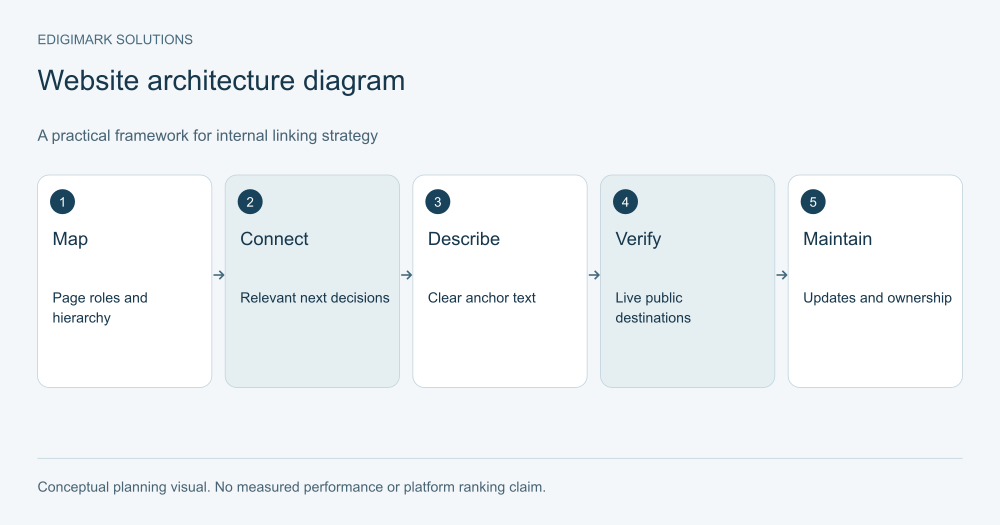
An internal linking strategy connects pages on your own website so readers can find context, deeper explanations and the next useful action. Build it around page purpose, website hierarchy and meaningful relationships. Use clear anchor text, real destinations and a maintenance process that keeps links relevant as the site changes.
The goal is a usable information system. More links do not automatically make a page better. A link should resolve a question the surrounding explanation creates, guide a visitor through the site or provide necessary context. Random connections added to satisfy a quota can interrupt reading and obscure the structure.
In this guide
- Why does an internal linking strategy need contextual links?
- How do you define website hierarchy before adding links?
- What is the difference between navigation and contextual links?
- How do you choose the right internal destination?
- How should internal link anchor text be written?
- What makes an internal link technically usable?
- How do you find and handle orphan pages?
- What should an internal linking audit record?
- What does a worked internal linking strategy look like?
- How do you maintain links after a migration or page update?
- How should internal linking support conversion paths?
- How do you measure internal linking improvements?
- What should a writer’s linking brief include?
- How do you separate contextual links from promotional clutter?
- What should an internal linking release checklist verify?
- Frequently asked questions
- Connect pages where the next question requires it
Why does an internal linking strategy need contextual links?
A visitor often arrives directly at an article or service page. They may not know the rest of your website exists. Contextual links help them find the related resource without returning to the homepage and guessing which menu item to use.
Links also express relationships between your pages. Google’s link guidance describes links as part of discovery and relevance. Apply that principle by building navigable resources, rather than claiming that a fixed number or pattern guarantees rankings.
For a hypothetical automation guide, a paragraph about data readiness can connect to a detailed resource on field quality. A paragraph about implementation support can connect to the appropriate service. Each link should make sense in the sentence even if the reader knows nothing about SEO.
How do you define website hierarchy before adding links?
List the main offers and information subjects the site serves. Identify the overview pages, detailed resources and commercial destinations. A hierarchy should make the relationship understandable to an outsider, not merely reproduce the company’s internal departments.
Assign a purpose sentence to important pages. An overview orients the reader; a comparison helps choose; a tutorial helps perform a task; a service page explains the offer. This prevents linking decisions from becoming based only on shared keywords.
Review the existing navigation. Can visitors predict where a resource belongs? Are broad subjects buried under unrelated labels? A contextual link can help, but repeated navigation confusion may require an architectural correction.
Keep a small inventory with the intended public URL, page role, owning subject and next useful destinations. This gives writers a reliable map without requiring them to search the entire site each time they draft an article.
What is the difference between navigation and contextual links?
Navigation links provide a stable route through the site. Menus, breadcrumbs and hubs can orient visitors. Contextual links appear within explanations and help with a particular next question. Both have value, but they serve different moments.
A menu can show the main service categories. An article can point to a specific service only when the explanation creates a relevant need. Repeating the whole menu inside every paragraph is not a contextual strategy.
Related-content components can help discover resources, but their selection should be meaningful. A card chosen solely because two pages contain the word “marketing” may lead to a different audience or task. Inspect the destination and the reason for the recommendation.
Test the public navigation on mobile. A desktop sidebar may disappear or move, and a long related-content panel may push the useful next step far down the page. The intended journey should survive the layout change.
How do you choose the right internal destination?
Ask what the reader needs next. Do they need a definition, a detailed procedure, alternatives, scope or an inquiry path? Choose the page that owns that task. The most commercially valuable page is not always the right immediate destination.
For a guide discussing disconnected customer records, CRM integration may be relevant when professional implementation is the next decision. If the reader is still diagnosing the problem, a supporting explanation may be more appropriate before the service discussion.
Keep destinations accurate and live. A planned resource can remain in an editorial map, but it should not become a link until the page exists and has been checked. Publishing a series incrementally requires a later link pass as new destinations become available.
Avoid pointing all links to the homepage. A homepage can orient a visitor, but it may not answer the specific question created by the anchor. Choose a destination whose content fulfills the link’s promise.
How should internal link anchor text be written?
Use concise wording that describes the destination in context. The reader should be able to predict what opens. “CRM integration scope” communicates a different task from “field mapping example,” even when both belong to the same subject.
Avoid generic wording when a meaningful description fits. Also avoid stuffing every related phrase into a long anchor. The surrounding sentence should remain natural and readable.
Do not use the same exact commercial phrase across every link simply because it is the destination’s primary keyword. Vary wording when context changes, while preserving meaning. Clarity matters more than a mechanically identical string.
Read the sentence aloud with the link text. If the wording sounds inserted or the link interrupts the thought, revise the sentence or move the link. A useful relationship should be easy to explain without referring to a score.
What makes an internal link technically usable?
The link should resolve to the intended public resource and function in the delivered page. Inspect actual URLs, including relative paths and frontend routes. A correct link in a draft may be rewritten or broken during import.
Use appropriate standard link behavior in the website implementation. A control that looks like a link but depends on an unexpected script can create problems for users and discovery. Give the website team an observable issue rather than a vague request to “add link juice.”
Review preferred URLs. Google’s canonical guidance includes consistency considerations for internal destinations. Link to the maintained public version of a resource where appropriate, instead of scattering obsolete or duplicate paths through the library.
Coordinate with web development when templates or routing need correction. The acceptance check should follow the link in the public page and confirm the final destination, not only inspect the saved content field.
How do you find and handle orphan pages?
An orphan page has no useful incoming internal path in the reviewed structure. Finding one is a prompt to ask whether it still belongs, not an automatic instruction to insert it into unrelated articles.
Review its purpose, accuracy and audience. If it is a useful resource, decide which overview or contextual explanation should connect to it. If it duplicates another page or no longer serves the offer, consider consolidation or retirement through an appropriate URL plan.
Check what evidence your tool uses to call a page orphaned. A crawl may begin from a limited entry point or miss a rendering path. Confirm the actual navigation before treating the label as a complete site diagnosis.
Record the decision. A page added to a relevant hub should be checked publicly. A page retired or merged needs the appropriate maintenance of incoming references. The goal is a coherent structure, not simply fewer orphan labels.
What should an internal linking audit record?
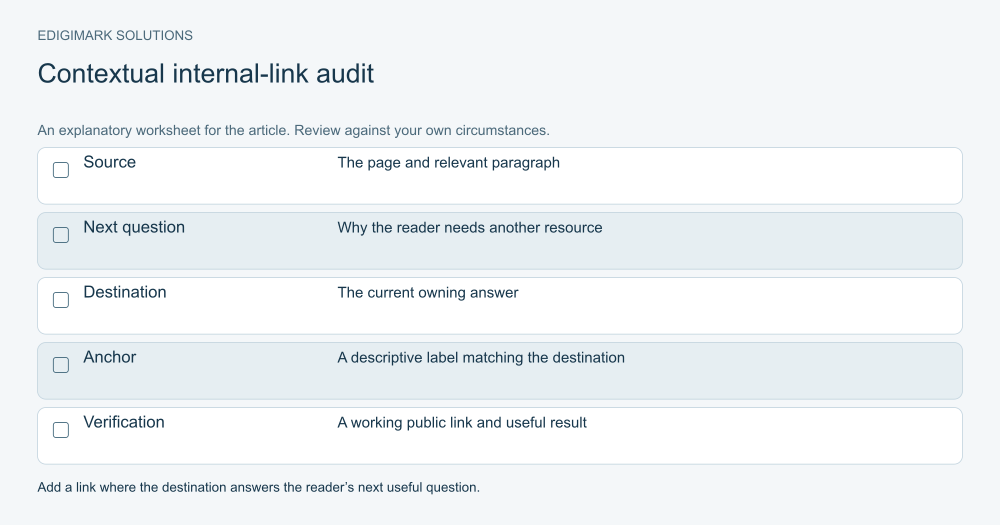
Use the source URL, destination URL, anchor, surrounding context, purpose and observed result. Add an owner and correction where needed. This makes a broken or misleading relationship actionable.
Separate technical failure from editorial mismatch. A broken destination needs a URL correction. A working link to an unrelated resource needs a content decision. A confusing anchor needs wording. Grouping all three as “link issues” can slow the handoff.
Review incoming and outgoing relationships for important pages. A service page may have plenty of outgoing links but no meaningful path from relevant guides. A popular article may send visitors to a destination that no longer matches its explanation.
Use representative sampling for a small site and broader automation where scale warrants it. The audit should remain maintainable. A massive export without a priority model can hide the few relationships that matter most to customers.
What does a worked internal linking strategy look like?
Imagine a hypothetical service company with an automation overview, a readiness guide, a decision comparison and a service page. The overview helps readers identify which question to investigate. The readiness guide explains prerequisites. The comparison helps choose a routing model. The service page explains implementation scope.
The overview links to the readiness guide where it discusses preparation. The readiness guide links to the comparison when readers are ready to choose a model. The comparison links to service scope when implementation responsibilities become the next question.
The pages do not need every possible connection. A link to marketing automation can be appropriate where the commercial task is clear. A broad mention of data may instead need a specific explanation rather than a service pitch.
The team verifies each destination and reviews mobile behavior. It later inspects useful transitions and inquiry fit, while recognizing that navigation data does not prove a particular link caused a sale. The scenario is illustrative, not a measured client result.
How do you maintain links after a migration or page update?
Keep a record of changed URLs and the resources that reference them. Update relevant internal destinations as part of the release rather than relying indefinitely on redirects. Follow the final destination to confirm that it still serves the task.
Review anchors when a page’s purpose changes. A destination can remain at the same URL while moving from a technical guide to a commercial offer. Incoming descriptions may become misleading even though no link checker reports a failure.
For merged resources, preserve the useful information and document which page owns the question now. Future writers should be able to find that decision so they do not recreate the old overlap.
Verify shared navigation after template changes. A correction in one component can affect several page types. Choose a proportionate public check set according to the scope of the release.
How should internal linking support conversion paths?
Link educational content to a next resource that matches the reader’s understanding. A guide can earn a transition to service scope by resolving a relevant question first. A comparison can offer a scoping checklist before a high-commitment inquiry.
Use conversion rate optimization to examine whether the path creates friction or confusion. The problem may be an unclear offer or premature action rather than the number of links.
Explain what happens after the action. A contact destination should make the inquiry process predictable. Users should understand which details help the team respond and whether the page is the right place for their request.
Keep qualification useful. Removing every condition can increase unsuitable submissions. A clear path should help the right person act and help the wrong-fit visitor recognize that another resource may be appropriate.
How do you measure internal linking improvements?
Define the intended change before measuring. Are readers finding a detailed explanation, reaching service scope or completing a support task? The metric should reflect that purpose.
Use data analytics to inspect relevant transitions where data is available. Keep page roles and event definitions consistent. A higher click count is not necessarily useful if the destination does not fit the audience.
Combine behavior with qualitative review. Sales and support can report whether linked resources reduce repeated explanations. Keep that feedback distinct from analytics counts while using both to identify the next improvement.
Record other changes in the period. A redesigned page or new campaign can affect navigation patterns. Describe what was observed without attributing every improvement solely to one link edit.
What should a writer’s linking brief include?
Provide approved public destinations, their purpose and the conditions where each is relevant. Keep unpublished pages in a separate planned list. This gives the writer useful choices without encouraging broken speculative links.
Ask for a few meaningful connections rather than an arbitrary quota. The right number depends on the explanation and the available resources. A short focused article may need fewer links than a broad planning guide.
Require public verification after import. Relative paths, anchors and route patterns can behave differently from the local draft. A saved article is only one stage in delivery.
How do you separate contextual links from promotional clutter?
Ask whether the linked resource resolves the uncertainty in the surrounding text. A paragraph discussing implementation responsibilities can reasonably connect to service scope. A paragraph defining a basic term may need a clearer example instead of a request to contact sales.
Review adjacent links together. Several individually relevant destinations can still create a difficult reading experience when every phrase becomes clickable. Keep the main explanation connected and place supporting links at meaningful decision points.
Check whether promotional modules compete with the article’s next step. A visitor who sees multiple unrelated service cards may not understand which option fits. Choose a clear primary transition and preserve other navigation in a less intrusive form.
Do not confuse a higher click total with a better journey. A misleading anchor can produce many clicks followed by confusion. Inspect the destination’s usefulness and the audience’s task before celebrating activity.
What should an internal linking release checklist verify?
Confirm that the source page contains the intended anchor and that the destination is the maintained public resource. Follow the link through any redirects and check the final content. Where a heading anchor is used, confirm that it reaches the correct section.
Test the journey on a small screen. Menus, hub cards and inline links may use different behavior in responsive layouts. A source page that looks clear on desktop can become crowded when navigation modules stack above the explanation.
Review the destination’s opening. It should fulfill the promise made by the source context. If the reader expects a comparison but sees only a broad introduction, the relationship needs refinement even when the URL is correct.
Keep a record of the changed relationships and owners. When one destination serves several important sources, future changes to its purpose should prompt a review of those incoming links. That simple dependency record makes maintenance more reliable than periodic broken-link scans alone.
Finally, update the editorial inventory so writers use the corrected destinations. A technical fix that never reaches the planning records can be reversed by a later import or copied draft. The strategy should remain consistent across production and public delivery.
Frequently asked questions
How many internal links should each article have?
Use the number that helps the reader navigate relevant decisions. There is no universal quota that guarantees a ranking. Choose meaningful destinations and avoid interrupting the explanation with unnecessary links.
Should every article link to a service page?
Only when the service is an appropriate next step. Educational and support tasks may need another explanation first. A forced commercial link can weaken the reader’s experience.
Can we link to unpublished articles in a planned cluster?
Keep those relationships in the editorial map, then add live links after the destinations exist and have been checked. Planned URLs should not be treated as verified resources.
Is a working link always a good link?
No. The destination may have changed purpose or fail to answer the anchor’s promise. Review editorial relevance alongside technical status.
What should we fix first in an internal link audit?
Prioritize broken or misleading paths that obstruct important customer tasks. Then improve discovery of useful orphan resources and maintain consistent destinations.
Connect pages where the next question requires it
Build the website around clear resources and useful transitions. Edigimark’s digital marketing services can align linking with search and content priorities. Contact the team with your page inventory and customer journey to scope a practical structure review.