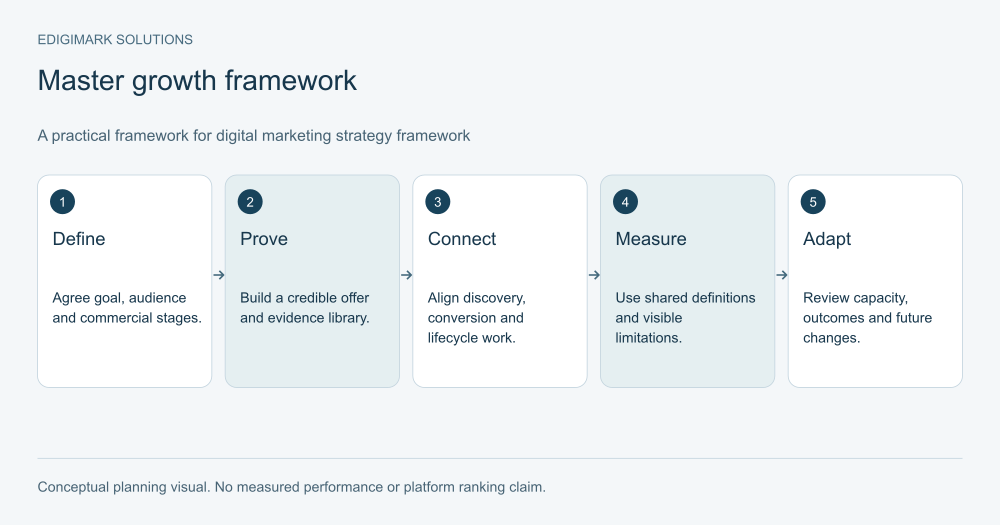

Start HubSpot marketing automation with the process that has a clear customer promise, reliable inputs and an accountable owner. Forms, confirmation, record quality and enquiry routing usually need attention before complex nurturing or lead scoring. Verify the features available in your actual HubSpot subscription, then test the complete process before expanding it.
A portal can contain many contacts and still lack the information needed for a useful workflow. It can also contain sophisticated rules while a simple enquiry remains unassigned. The first automation should solve an observed problem, with a result the receiving team can verify.
This guide proposes an implementation order rather than a universal portal configuration. HubSpot changes features and packaging, so use its current documentation and your account’s available actions when making the final plan.
In this guide
- What should HubSpot marketing automation preparation check?
- Why should HubSpot form automation come first?
- What should the first HubSpot form follow-up deliver?
- How should contact properties be prepared for automation?
- What should HubSpot enquiry routing automate next?
- How should HubSpot lifecycle updates be designed?
- When should automated nurture be added in HubSpot?
- How should HubSpot workflow enrolment be specified?
- When is HubSpot lead scoring worth implementing?
- What should HubSpot CRM sync establish before expansion?
- What does a sensible HubSpot automation launch order look like?
- Which test records should a HubSpot workflow include?
- How should HubSpot automation performance be reviewed?
- How should HubSpot workflows be governed after launch?
- How should competing HubSpot automation requests be prioritised?
- Frequently asked questions
What should HubSpot marketing automation preparation check?
Inventory the relevant forms, contact and company properties, owners, lifecycle definitions, email assets and connected applications. Identify which team uses each item and whether another workflow already depends on it.
Verify subscription, permissions and action availability. HubSpot’s workflow documentation currently lists Professional and Enterprise subscriptions across several Hubs, with specific actions and limits depending on the subscription. Access to one workflow feature does not establish access to every object or action.
Write the process outside the editor first. Describe the event, eligible records, intended action, exclusions, exit and responsible person. This makes it easier to review the business logic without being distracted by the interface.
Marketing automation should include an inventory of existing rules. A new workflow may interact with old assignments, lifecycle updates or email paths even if its own diagram appears straightforward.
Why should HubSpot form automation come first?
Forms are often the point where the business makes a concrete promise: deliver a resource, respond to a question or arrange a discussion. Automating that promise is easier to define than interpreting a long history of activity.
HubSpot’s form automation guide describes simple workflows triggered by submissions, with limits that vary by subscription. It also notes that those simple workflows enrol contacts each time the form is submitted. Repeated submissions therefore deserve an intentional response.
Review the form’s fields and purpose. Keep required information connected with the action being requested. A consultation request and a newsletter subscription should not automatically create the same downstream process.
Test on the actual public page. An embedded form needs to submit, show the promised confirmation, create or update the intended record and preserve context. Web development can help verify the public implementation while the automation owner checks the portal outcome.
What should the first HubSpot form follow-up deliver?
Deliver the promised item or acknowledgement accurately. If the visitor requests a guide, provide the correct resource. If they request a discussion, explain the next step the business can actually support.
Avoid claiming a personal review has occurred when the message is only an automatic receipt. A clear acknowledgement is useful on its own. Name the type of response the person should expect and provide a sensible contact route.
Check links, sender details, reply handling and fallback content. The team should know where a reply goes and who reads it. A reply-enabled message that reaches an unattended inbox creates a new failure.
Review communication eligibility before any marketing email action. HubSpot’s marketing contact guidance explains how marketing status relates to the account’s contact tier. Treat that status separately from the person’s communication preferences; changing a billing-related category does not establish permission or relevance.
How should contact properties be prepared for automation?
Define the meaning, type and owner of each property used in a trigger or branch. A field called “interest” is not useful if different forms populate it with unrelated values.
Use consistent options where the business needs stable routing. Preserve the person’s actual request in a suitable text field when a limited option list cannot capture it. Do not force detailed needs into a category that loses important context.
Create a clear treatment for unknown values. Missing region, company or product interest should lead to a defined review path, not a silent default that makes the record appear more certain than it is.
Inspect existing records before using a property in a live workflow. A rule applied to a newly cleaned field may behave differently for historical data. Decide whether older records require correction, exclusion or a separate review.
What should HubSpot enquiry routing automate next?
Route explicit requests to an owner who can respond. Use meaningful criteria such as service, region or existing relationship only when those criteria reflect the actual operating model.
Respect current ownership. An existing customer or active opportunity may need the established owner rather than the default acquisition route. Include the relationship context in the routing decision.
Set a fallback for missing information or unavailable ownership. The fallback needs a named coordinator and a visible queue. “Unassigned” should become a monitored exception, not a permanent destination.
Test the receiving team’s view. The assigned person should see the original request, useful account context and next action. CRM integration can help keep those details accessible when another system participates in the handoff.
How should HubSpot lifecycle updates be designed?
Define the business condition behind each lifecycle label before automating it. A captured contact, marketing-qualified lead and sales-qualified lead describe different decisions, not merely different levels of email activity.
HubSpot’s lifecycle guidance explains the stages and update behaviour. Check the documented rules before implementing transitions, especially when a process includes returning a lead to an earlier path.
Keep qualification and communication preferences separate. Moving a lead to a sales stage should not change subscription preferences, and an email opt-out should not erase the relationship history.
Record who can override a stage and why. Automation should support a reviewable process while allowing appropriate human judgement. If the team revises a definition, document the date so reports do not mistake a rule change for a demand change.
When should automated nurture be added in HubSpot?
Add nurture when the business has relevant content, clear audience eligibility and an understood next decision. An available email action is not a reason to create a sequence without a purpose.
Begin with one coherent path tied to a known interest. For example, a hypothetical business might nurture eligible contacts who requested a planning resource with information about requirements, implementation options and a relevant discussion opportunity.
Define exits before delays and messages. A reply, a booked meeting, an active opportunity, changed preferences or a confirmed mismatch may change the appropriate response. Coordinate those conditions with sales.
Review the whole communication programme. A contact can qualify for several separate paths, and the combined experience may be excessive even if each individual workflow looks reasonable. The owner needs a way to inspect overlapping eligibility and current human activity.
How should HubSpot workflow enrolment be specified?
Describe the precise event or state that should start the process. “All leads” is rarely sufficient. Identify the relevant form, property condition or approved manual cohort and any exclusions.
Decide how existing matching records are handled when the workflow is first enabled. A rule intended for future enquiries can unintentionally affect a large historical group if launch settings are not reviewed.
Specify repeated-entry behaviour. A second explicit request may need another acknowledgement, while an educational path may not need to restart from the first message. Test the intended case rather than assuming all automation types behave identically.
Keep a plain-language explanation with the workflow. The next owner should be able to answer why a particular record entered and which condition permits it to leave. This is especially useful when several workflows use the same properties.
When is HubSpot lead scoring worth implementing?
Implement HubSpot lead scoring after the business can describe a useful review decision and has sufficiently reliable evidence. A numerical model cannot repair inconsistent lifecycle definitions or missing account information.
HubSpot’s lead scoring documentation supports scores based on attributes and actions, with score types and quantities depending on the subscription. Verify the available model before committing to a design.
Keep fit and engagement interpretable. A strong-fit direct request can warrant review without a long activity history, while repeated reading by an unsuitable account should not automatically create sales priority.
Start with a small, explainable model and test against real accepted and rejected cases. Define the action at the threshold, exceptions, review owner and feedback process. Do not promote every record with a high score to SQL without the sales qualification your team has agreed.
What should HubSpot CRM sync establish before expansion?
Define which records and fields need to move, the direction of updates and the system responsible for each value. Two connected systems can disagree even when the connection itself is functioning.
HubSpot’s data sync documentation describes configuration including sync direction and conflict resolution. Check the connector’s supported objects, mappings and requirements before assuming a desired field can be synchronised.
Use a clear matching rule and test repeat records. An existing contact should not become a disconnected identity merely because another system formats a value differently. Associated company and opportunity context also needs verification where relevant.
Assign monitoring responsibility. A rejected record or missing field can affect routing, nurture and reporting. The integration owner should know how failures appear, how they are resolved and whether downstream actions must be paused while the data is corrected.
What does a sensible HubSpot automation launch order look like?
The following order is a planning example, not a product requirement. Adapt it to the observed problem and the capabilities available in the account.
| Phase | Practical outcome | What must be verified |
|---|---|---|
| Capture | The explicit request is recorded accurately | Public form, record match and context |
| Confirm | The promised acknowledgement or asset is delivered | Eligibility, correct content and reply route |
| Route | A responsible person receives the request | Assignment, context and fallback |
| Nurture | Eligible contacts receive relevant help | Content purpose, exits and overlap |
| Score | Useful evidence prioritises review | Fit, interest, thresholds and sales feedback |
| Expand | Connected processes share reliable context | Field ownership, sync exceptions and reporting |
The order protects basic operational reliability. If the current issue is a broken sync that prevents all capture from reaching sales, repairing that dependency comes earlier. Follow the actual architecture rather than treating the table as an inflexible checklist.
Which test records should a HubSpot workflow include?
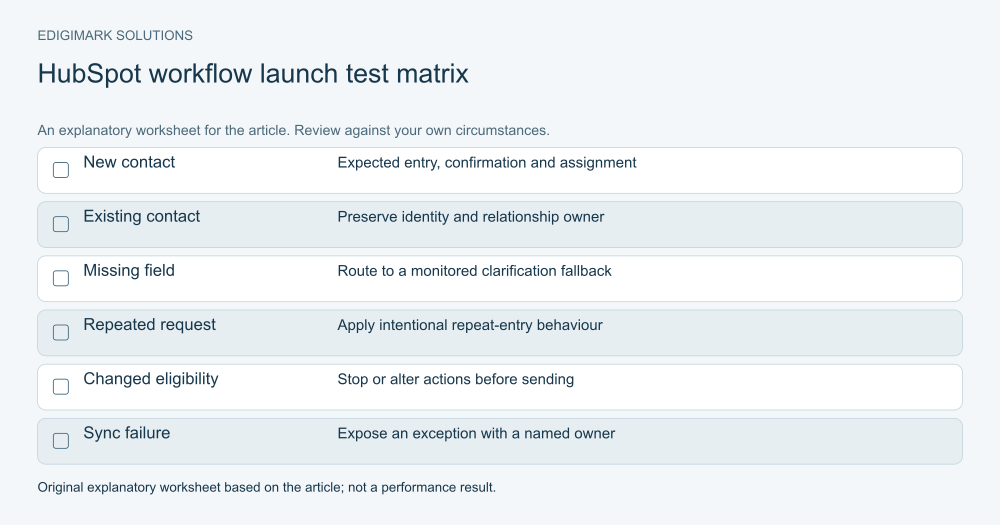
Use authorised test contacts that represent the cases the business expects. Include a new eligible contact, an existing contact, a current customer, missing routing information, a changed preference and a repeated submission.
For each case, inspect entry, actions, delays, property changes, ownership and exit. Verify what happens when the record becomes ineligible while waiting. Confirm that the workflow does not create duplicate tasks or conflicting messages.
Test the receiving team’s process as well as the portal behaviour. An assignment can be technically correct while the owner cannot see the information needed to act.
Record the expected and observed result. Fix the cause of a failure and repeat the affected case. Do not enable a large audience because the ideal example worked while exception cases remain unexplained.
How should HubSpot automation performance be reviewed?
Begin with reliability: failed actions, unassigned requests, missing information and unresolved handoffs. These measures explain whether the process fulfils its promise.
Then review useful commercial progression, such as accepted conversations and qualified opportunities. Define the stages and observation period. An increase in workflow enrolments is not automatically an increase in demand.
Inspect record histories when reported outcomes look unexpected. A property update, new enrolment condition or changed definition can affect the numbers. Record these implementation changes alongside the report.
Data analytics should help the team interpret operational and commercial evidence together. Avoid attributing every later sale to a workflow simply because the contact was enrolled at some point.
How should HubSpot workflows be governed after launch?
Give each workflow a named owner and a plain-language purpose. Record its dependencies, messages, important properties and review trigger. Use consistent naming so the team can find related assets.
Review changes before they affect live records. A property renamed or repurposed for one campaign may alter several existing rules. Keep a change record and an appropriate recovery plan for consequential edits.
Retire obsolete paths deliberately. Check whether other processes depend on their properties or actions before removal. Keep enough history to explain past outcomes without leaving unused rules active indefinitely.
Ask Edigimark to review your HubSpot automation priorities when the portal has many workflows but capture, routing or qualification remains difficult to explain. A useful implementation order connects each feature with a verified business task.
How should competing HubSpot automation requests be prioritised?
Compare the customer task, observed failure, dependency and maintenance effort for each request. A department asking for more branches may be describing a missing field or unclear ownership that deserves a simpler repair.
For example, a hypothetical sales team wants a detailed engagement score because enquiries arrive without context. First inspect whether the request text and relevant page information are reaching the receiving record. Fixing that mapping may make the immediate conversation more useful without a new scoring model.
Keep estimates and verified observations separate in the priority list. A proposed nurture path may be plausible but untested; a broken enquiry assignment is an observed operational failure. Both can deserve work, but they need different evidence and acceptance criteria.
Review priorities with the people who maintain the portal and receive the handoff. Their capacity determines whether the proposed process can remain reliable after launch. Record the decision so new feature requests can be compared with a clear operating plan.
Frequently asked questions
Does HubSpot Starter include every automation feature?
No. Capabilities differ by subscription and action. Simple form automation and the full workflow tool have different availability and limits. Check the current documentation and the actions accessible in your account.
Should HubSpot lead scoring be the first automation project?
Usually, establish reliable capture, field definitions and handoff first. Scoring becomes useful when the team has a clear review decision and can validate the evidence against sales outcomes.
Can a form submission restart automation for an existing contact?
It can, depending on the automation type and configuration. HubSpot documents repeated submission behaviour for simple form workflows. Test repeat-entry cases and define the intended response before launch.
Is marketing contact status the same as communication consent?
No. Marketing status relates to how contacts are categorised for the relevant tools and contact tier. Communication preferences and eligibility need their own review; do not treat a category change as permission to send.
What should be verified before HubSpot CRM sync goes live?
Check supported records, field meaning, matching, update direction, conflict rules and exception monitoring. Test existing identities and relationship context, then verify that receiving teams can use the synchronised information.