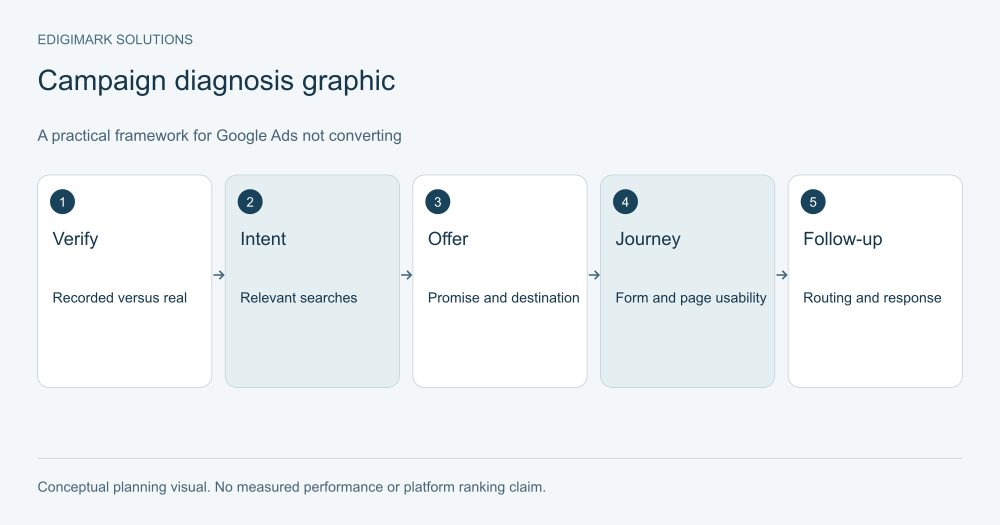
If Google Ads is not converting, first establish whether valuable actions are missing or merely unrecorded. Then work through traffic relevance, offer clarity, landing-page usability and follow-up quality. Changing bids or increasing budget before checking those layers can spend more money without revealing the cause.
“No conversions” can describe several different situations. The account may record nothing while the business receives enquiries. Visitors may reach the site but fail to complete the form. Forms may arrive, but none become suitable leads. Each situation needs a different investigation.
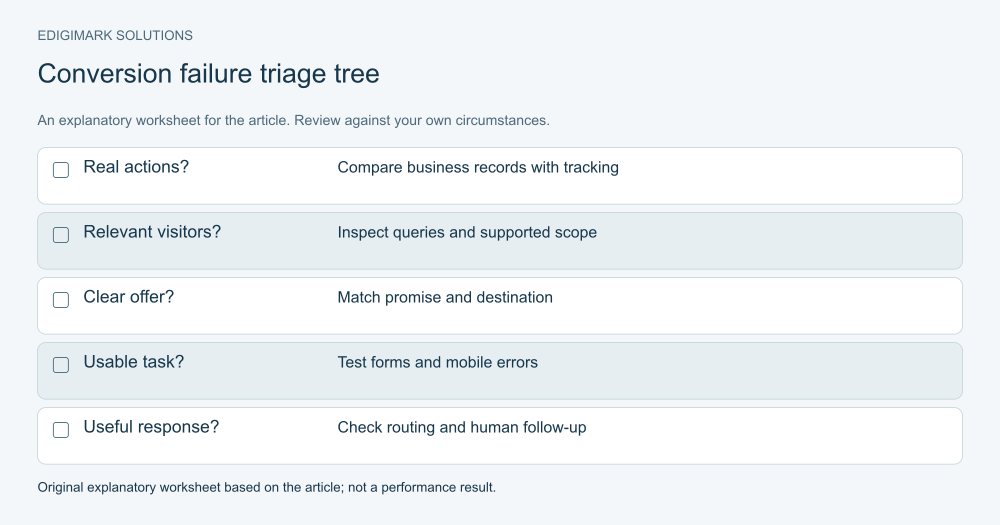
Why is Google Ads not converting in your account?
Write the observed symptom in plain language. “The campaign recorded zero enquiries this week” is different from “We received ten enquiries and sales rejected all of them.” “The form works on desktop but fails on a phone” is more specific than “The website does not convert.”
Identify the expected action and where it should appear. A form submission may be recorded by the website, analytics, Google Ads and the CRM. A phone enquiry may use a separate process. A completed purchase may have an order record and a refund later.
Compare a small sample of real records across the relevant systems. Remove personal information from the diagnostic report. The purpose is to locate the break in the chain, not to expose prospect details to everyone reviewing the campaign.
This initial definition gives the digital marketing team a usable question and prevents several people from solving different problems under the same label.
How do you start conversion tracking diagnosis?
Test the actual action. Submit the form through the same page and device conditions a visitor would use, complete an appropriate test order where feasible, or verify the call route. Confirm the action is received by the business before judging the advertising tag.
Then inspect the conversion action, its trigger, counting method and reporting role. A click on “Submit” is not the same as a successful form submission. A thank-you page that can be revisited may need careful counting. A duplicated tag can inflate results.
Google’s conversion tracking troubleshooting guide explains checks for recording and tag problems. Use appropriate debugging tools and compare the results with the configured action. A tag appearing on the page does not by itself prove that the intended event is recorded correctly.
Document any consent-related recording limits and cross-domain steps. Do not bypass user choices to make the dashboard look complete. A measurement limitation should be understood and reported rather than silently removed.
Are the right conversion actions being used?
Review what the campaign is trying to optimise. Page views, button clicks, form starts and completed enquiries can all appear in a measurement plan, but they have different meanings.
Google’s primary and secondary conversion documentation explains their reporting and bidding roles, with campaign goals and custom goals affecting how actions are used. Inspect the current goal configuration rather than assuming the account still matches an old setup document.
If an easy interaction is treated as the main success signal, the campaign can appear active without producing useful commercial outcomes. Conversely, a properly configured later-stage action may have fewer observations and more delay. The correct choice depends on the business and the reliability of the signal.
Keep diagnostic actions available for understanding the journey while making the commercial outcome explicit. A tracking change should be recorded so future comparisons account for the new definition.
Could the problem be a delay or a small sample?
Some actions occur after the click rather than during the first visit. A buyer may return, consult a colleague or wait until a budget decision. Recent campaign data can therefore be incomplete for downstream outcomes.
Check the date range and reporting context. Compare cohorts with similar time to progress. Do not compare yesterday’s new enquiries with last quarter’s fully worked opportunities and conclude that quality has collapsed.
Also consider whether there has been enough relevant traffic to assess the outcome. A small number of clicks without a conversion may warrant checking the journey, but it does not prove that a channel or market is unviable.
Avoid using “not enough data” to ignore obvious faults. A broken form, an incorrect destination or advertising an unavailable offer should be repaired immediately. Distinguish uncertainty about performance from evidence of a concrete failure.
How do you identify keyword intent mismatch?
Inspect the queries actually reached where the account provides them. Compare them with the service, product and audience the campaign is supposed to serve. A keyword can sound relevant in a planning document while attracting a different task in practice.
For a hypothetical business selling commercial design services, “design templates” may attract people wanting a free resource rather than a service provider. “Design software” may attract tool buyers. Those visitors are not necessarily poor prospects in general; they are poor matches for the offer being advertised.
Review exclusions, location settings and any meaningful audience conditions. Check whether the ad makes the supported scope clear. A misleadingly broad promise can attract enquiries the company cannot fulfil.
Do not remove every query that fails to convert after a few observations. Look for clear semantic mismatches and evaluate relevant queries over a suitable period. Diagnosis should improve relevance without overreacting to noise.
Does the ad promise match the page?
Open the ad destination and compare the promise with the page’s first useful explanation. If the ad offers a specialist consultation, the page should explain that consultation. If the ad highlights a particular product feature, the visitor should be able to find it without searching through a generic homepage.
Google’s landing-page optimisation guidance emphasises relevant information and a usable experience. Message consistency helps the visitor understand that they reached the intended destination.
Check important qualifications too. An ad suggesting immediate availability should not lead to a page with a long wait. An offer aimed at businesses should not leave the visitor unsure whether it serves individual consumers. Accurate limits are part of the message match.
If the campaign has several intents, consider whether they need different destinations. The goal is a relevant decision path, not a separate page for every minor keyword variation.
How should paid landing page friction be investigated?
Walk through the page on the devices visitors use. Look for slow-loading content, overlays covering the action, unclear labels, inaccessible fields and error messages that do not explain how to proceed. Test the whole journey, including scheduling tools or checkout steps on another domain.
Observe a few representative people completing the task where practical. Ask what they think the offer includes and what will happen after they submit. Their interpretation can reveal issues that a visual design review misses.
Review form fields individually. Each should have a reason tied to qualification, routing or delivery. Removing a necessary field can make sales work harder; adding unnecessary fields can increase hesitation. There is no universal correct field count.
Conversion rate optimization helps prioritise these findings, while web development addresses the implementation failures. Verify each repair with the same task that originally exposed it.
Is the offer valuable and credible enough?
A working page can still fail to explain why the visitor should act. Ask what decision the offer helps them make. A vague “Get started” form may demand commitment before providing enough information about the service.
Show the scope, prerequisites, process and appropriate proof. For a demonstration, explain what will be covered. For a quote, say what information is needed. For a resource, provide a useful description of its contents.
Proof must be genuine. Use real examples with context and appropriate permission. Where a worked example is illustrative, label it as hypothetical. Unsupported results or invented testimonials may appear persuasive in a draft but create a misleading page.
Also check commercial alignment. The visitor may be interested but unable to afford, implement or access the offer. Clear pricing context, eligibility and requirements can help the right person decide and reduce unsuitable submissions.
What if the campaign converts but the leads are poor?
Treat this as a qualification problem rather than a success hidden inside the platform. Review rejected enquiries and classify the reasons consistently. Examples include unsupported geography, irrelevant use case, spam, duplicate requests or a mismatch with the intended business type.
Compare those reasons with queries, ads and pages. If the page implies a free tool when the business sells a managed service, the mismatch is in the offer. If the campaign reaches unrelated searches, investigate targeting and exclusions. If valid leads are misrouted, investigate the operational process.
Connect outcomes with the CRM where possible. CRM integration can preserve acquisition context and qualification data, but sales still needs to update outcomes accurately.
The goal is not simply fewer leads. It is a more useful connection between the people reached, the action requested and the service the business can deliver.
Could follow-up be the missing layer?
Check whether enquiries reach the appropriate owner, whether acknowledgement reflects the request and whether the human response uses the information already provided. A suitable lead can lose momentum when nobody receives it or when several people send conflicting messages.
Review existing-customer and duplicate handling. Someone requesting support should not receive a prospect sequence. A person who has booked a meeting should not continue receiving reminders to book the same meeting.
Marketing automation can help with routing and suppression, but it should support a defined human process. Automating an unclear process can make the problem repeat faster.
Ask sales to share concrete observations rather than a general verdict that “ads leads are bad.” A useful note explains the mismatch or the unanswered question. That information can guide the next campaign or page change.
How should you prioritise the fixes?
Fix verified blockers first: broken forms, incorrect destinations, duplicated recording or an unavailable offer. These problems can invalidate the rest of the analysis.
Next, address clear relevance mismatches and missing information that suitable visitors need. Then test more uncertain improvements, such as alternative messaging or a revised offer. Record the hypothesis, affected segment and intended measure.
Avoid changing every campaign setting and the entire page at once unless an urgent failure requires it. Broad simultaneous changes make it difficult to learn which factor mattered. Use data analytics to review connected evidence rather than choosing a change from a single dashboard number.
Some fixes need verification immediately; their commercial effect may need longer observation. Keep those two stages separate in the task log.
What should a useful diagnosis report contain?
State the original symptom, the evidence inspected and the layer where the issue was found. Include the affected pages or actions, the proposed repair, the owner and the verification plan. If the cause remains uncertain, say which investigation is next.
A useful report might say: the form completed on desktop but failed on a particular mobile layout; development repaired the overlapping element; a fresh test confirmed receipt; campaign outcomes will be reviewed after relevant traffic reaches the repaired page. That is more actionable than “Improve conversion rate.”
Keep performance claims proportionate to the evidence. A repaired form proves that the technical blocker was addressed, not that the campaign will meet a particular acquisition cost.
Ask Edigimark to diagnose your search-to-enquiry journey if you need a clear sequence connecting the account, page, tracking and sales process.
What should be checked before resuming a paused campaign?
Repeat the task that exposed the failure. If the issue was a form, test successful submission, validation errors and receipt by the assigned owner. If the issue was an incorrect destination, open every affected ad URL and confirm the offer. If tracking was repaired, inspect the intended event and counting behaviour.
Confirm that the commercial process is ready too. A restored form is not enough when the enquiry inbox remains unmonitored. A new page is not enough when the product is unavailable. Document the person responsible for the first review after traffic resumes.
Use a controlled restart where appropriate. Keep the change record and avoid adding unrelated expansions at the same time. That gives the team a clearer view of whether the repaired journey now works with relevant visitors.
How can you prevent the same conversion problem returning?
Add a routine check after significant website releases, form changes, scheduling-tool updates and measurement changes. These are sensible triggers because they can affect the path a visitor takes. Include mobile and desktop tasks rather than checking only that the homepage loads.
Keep an inventory of the live campaign destinations and the conversion actions they support. Assign owners to pages and integrations. When the offer changes, the owner should know which ads and automated messages need review.
This maintenance does not remove the need for performance analysis. It reduces the chance that the team spends weeks analysing campaign settings while a preventable operational failure sits underneath the data.
Keep one person accountable for confirming that the repair reached production. A change visible in a staging environment does not prove the live visitor journey is fixed. Open the public destination from the actual campaign, check the relevant device layout and confirm receipt of the resulting action. Record that verification before interpreting new performance data from the resumed campaign.
Frequently asked questions
Should I increase the budget when there are no conversions?
Check measurement, relevance and the page first. More budget may help when suitable exposure is too limited, but it also increases waste when the offer or journey is broken. Make the increase a controlled decision supported by evidence rather than the default response to a low count.
Why does Google Ads show fewer leads than the CRM?
The systems may use different attribution, dates, consent-related recording or lead definitions. Some CRM enquiries may come from other sources. Compare a sample and inspect the measurement setup before assuming either total is wrong. Document the limits of the comparison.
Can a high click-through rate coexist with no leads?
Yes. People can respond to an ad but find an unsuitable offer, an unclear page or a failing form. A high click-through rate describes attention at one stage. It does not prove the full journey produces suitable customers.
Should I rebuild the whole landing page?
Only when the evidence supports a broad change. A specific form failure or missing explanation may need a focused repair. Observe the task, identify the barrier and verify the fix. A complete redesign can introduce new problems if it is undertaken without diagnosis.
How do I know whether the problem is traffic or the page?
Review actual queries and enquiry quality alongside a task-based page inspection. Clearly irrelevant queries point toward traffic mismatch; relevant visitors failing at a broken or confusing step point toward the journey. Several layers can contribute, so investigate them in order rather than forcing one explanation.
Put the ideas to work
Explore our connected growth services →