This AI search optimization checklist helps a business inspect the pages, evidence, access and measurement behind its search presence. Use the 30 checks to find concrete gaps, assign owners and verify corrections on the public website. The checklist improves readiness and usefulness; completing it does not guarantee an AI mention, citation or ranking.
Begin with commercially relevant pages rather than crawling every URL without a purpose. Select a service page, a useful explanatory article, a comparison resource and any template that behaves differently. Record the date, affected URLs and evidence for each check. A screenshot, response header or tested form is more useful than a checkbox based on assumption.
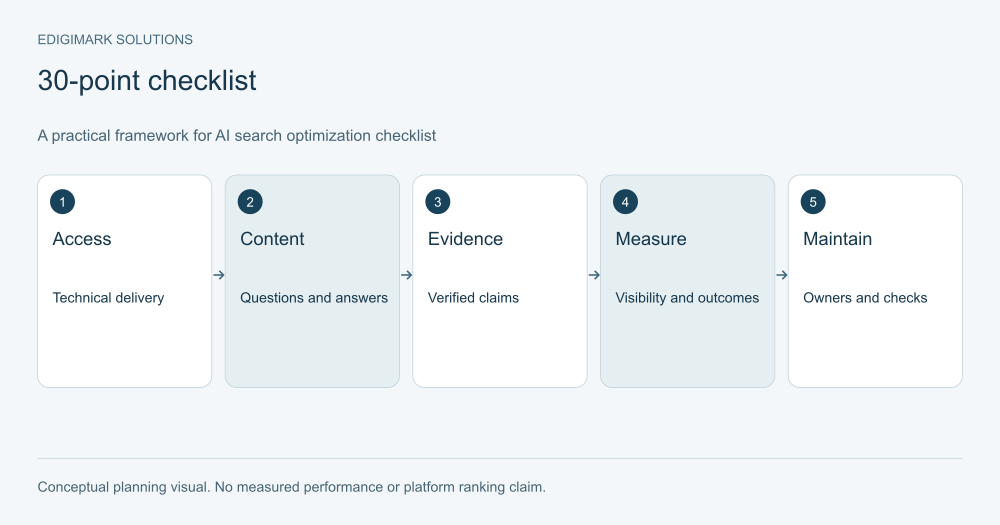
Conceptual framework for AI search optimization checklist; examples are illustrative.
How should you run an AI visibility audit with this AI search optimization checklist?
Create four columns for each item: current observation, action, owner and verification. Use “unknown” when a fact has not been checked. Unknown is different from failed, and both are different from a confirmed pass. This keeps the audit from looking complete before anyone has inspected the site.
Prioritize by impact and dependency. A blocked or broken core page deserves attention before a new decorative diagram. Inaccurate service information deserves attention before expanding the content calendar. Work that depends on a release or a subject expert should be scheduled with that owner.
For Google-specific eligibility, consult the current AI search optimization guide. Cross-platform visibility requires platform-specific checks; do not assume that one crawler rule governs every assistant or that a single plugin can validate them all.
AI search technical checklist: access and delivery
1. Confirm that the public page returns the intended content
Open the public URL and inspect the actual response. A CMS preview is not enough. Check whether the page loads successfully, shows the correct article and avoids a soft error disguised as a successful response. Record unexpected redirects and compare the final destination with the intended resource.
2. Review crawler rules affecting crawlability for AI search
Check what your rules allow and block, and why. Search access, model training and user-triggered retrieval can involve different controls. Document the business decision before editing them. Google’s robots documentation explains the limits of robots.txt; do not treat it as a universal removal or privacy mechanism.
3. Inspect indexability and crawlability for AI search
Check page-level robots directives and relevant response headers. A staging rule can accidentally reach production. Conversely, an account-only or private resource may need intentional restrictions. The task is to verify the intended state, not to make every URL indexable indiscriminately.
4. Confirm the preferred canonical URL
Inspect the canonical on the public page, including headless templates. It should identify the intended public resource and align with your URL plan. Google’s canonical guidance treats canonicalization as a preference signal. Do not point a distinct article to the homepage merely to satisfy a field.
5. Check Google’s Search generative AI control
Inspect the relevant Search Console property’s setting and inherited state. Google documents this control separately from ordinary Search and model-training controls. Record the actual choice before drawing conclusions about eligibility. Only an authorized owner should change the setting.
6. Verify internal links that support crawlability for AI search
Follow links from meaningful entry pages to the resource. A page that exists only in a sitemap can still be difficult for visitors to find. Check that navigation and contextual links resolve to real URLs, including on mobile and after a frontend release.
7. Confirm rendered content for your AI visibility audit
Inspect important headings, body text and links after the page loads. JavaScript-dependent delivery should be checked with the website team. A skeleton interface or empty content region does not become useful because a title appears in the browser tab.
8. Check mobile readability and interaction
Read tables, expand accordions and complete the main action on a small screen. Watch for horizontal overflow, tiny diagrams, overlays and controls that hide the answer. The page should remain usable when a visitor arrives directly at an article rather than through the homepage.
9. Diagnose representative page performance in your AI visibility audit
Test a real service page and article template, then identify which assets or scripts cause meaningful delay. Avoid optimizing a score in isolation. Focus on the visible experience and the interaction the user needs to complete. Share a clear problem statement with web development.
10. Check sitemap and URL consistency in your AI visibility audit
Inspect whether your sitemap lists the intended live URLs and whether those URLs resolve correctly. Find outdated paths, unnecessary duplicates and redirects created by earlier launches. Keep the URL inventory aligned with the pages you actually maintain, rather than treating sitemap generation as permanent proof of correctness.
Generative search checklist: questions and useful content
11. State each page’s customer task
Write a sentence describing what the visitor should understand or decide. If several articles have the same sentence, examine overlap. A page about implementation prerequisites should differ from one comparing vendors. Distinct tasks give your library a clearer purpose than a list of keyword variants.
12. Answer the central question early
Place a direct conclusion near the opening, with essential conditions beside it. A reader should not need to pass through a history of the industry before learning whether the resource answers their question. Concision should preserve qualifications rather than remove them.
13. Explain terminology and relationships
Define terms that matter to the decision and show how they relate. “Synchronization” needs context: which records, which direction and which schedule? Avoid assuming that a category label communicates product behavior. Precise explanation helps both a first-time reader and an experienced buyer checking a detail.
14. Use headings that describe the decision
Review headings without reading the paragraphs. They should show the page’s progression and make sections easy to find. Questions are useful when they reflect real concerns. Do not force keywords into headings that make the article harder to scan.
15. Include a worked example where it helps
Show the inputs, choices and limitations of a hypothetical scenario. Label it clearly. A realistic example can make an abstract framework usable without pretending to be a client case study. If you use an actual case, verify permission and the basis of every result.
16. Show alternatives and exceptions
Explain where a recommendation may fail or a different approach may be preferable. A comparison table can make tradeoffs visible. Avoid implying one solution fits every budget, technology stack or operating model. Readers need the boundaries of a recommendation to apply it responsibly.
17. Remove duplicate and low-value coverage
Find pages whose only difference is a slightly changed phrase. Decide whether to merge, refine or retain them based on distinct tasks and evidence. Keep a record of the decision and coordinate URL changes. More pages create more maintenance obligations; quantity alone is not a content strategy.
18. Make FAQs resolve remaining uncertainty
Choose questions that the main explanation has not already answered fully. Avoid repeating a keyword in every question. A useful FAQ might cover prerequisites, exceptions or a practical implementation choice. It should add information, not merely create another place to restate the introduction.
19. Make service scope explicit
Explain deliverables, prerequisites, exclusions and how an engagement starts. Buyers need to distinguish a general educational recommendation from the service your company actually provides. Link relevant explanatory content to digital marketing services only when the destination fits the reader’s next step.
20. Use visuals to explain, not decorate
Inspect whether a diagram adds sequence, comparison or relationships that the text alone makes difficult. Give it accurate alt text and a caption. A conceptual funnel must not imply measured conversion rates. A before-and-after chart needs real data; otherwise use a labeled illustrative framework.
Generative search checklist: authority and evidence checks
21. Attribute important factual claims
Link an important claim to a source that directly supports it. Prefer original documentation for platform behavior and describe the scope of a study when citing results. A source list at the end is insufficient if readers cannot tell which claim a link supports.
22. Verify company-specific assertions
Review statements about capabilities, availability, integration support and service coverage with the responsible owner. Remove claims that cannot be substantiated. Do not let a writer infer capabilities from a competitor’s website or an old sales deck. The public page should reflect what you can currently deliver.
23. Explain methods behind original evidence
If you publish a survey, test or case result, explain what was measured, when, how and under which conditions. Keep the original records available internally. A chart without a method can look persuasive while remaining impossible to evaluate.
24. Keep business identity consistent
Check the company name, public contact details, service descriptions and relevant profiles. Correct contradictions that could confuse a buyer. Identity consistency is an information-quality task; it is not a promise that a search system will create a particular knowledge panel.
25. Validate applicable structured data
Use markup that accurately describes the visible resource and meets the relevant format’s requirements. Check for conflicting template output. Do not add unsupported ratings, invented authors or a special “AI schema” claim. Validation checks syntax and eligibility conditions, not the quality of your entire strategy.
AI visibility audit: measurement and operational checks
26. Define mentions, citations and visits separately
A brand mention, a linked citation and a website visit are different events. Give each a definition and keep them separate in reporting. A sampled prompt result should include the prompt and conditions. Combining them into a single “AI reach” total can obscure what actually happened.
27. Inspect available first-party reporting
Review Search Console and analytics with the appropriate access. Google’s Generative AI performance report provides impression information for supported Search features. Check its current scope before assuming it includes every assistant, every feature or a complete conversion journey.
28. Connect inquiries with qualification
Define what makes a lead relevant and how the CRM records it. An increase in form submissions can be misleading when the fit deteriorates. Use data analytics and CRM integration to improve the connection between website actions and sales outcomes.
29. Assign maintenance owners and triggers
Give each important page a subject owner and a review trigger. Product changes, broken sources and recurring customer confusion should prompt attention. A scheduled review is helpful, but the answer may become inaccurate before the next calendar date.
30. Verify corrections on the public website
After an update, repeat the relevant check. Confirm the actual page title, canonical, content, links, form and visual as appropriate. Save the verification evidence. A completed ticket or saved CMS field does not establish that the frontend delivered the change.
How do you prioritize AI visibility audit findings?
Use an impact-and-dependency discussion rather than an arbitrary score. Group findings into access failures, inaccurate information, user friction and improvements. Access failures on important pages usually require prompt attention; enhancements can wait until the resource is functioning and credible.
For a hypothetical service site, the audit may find a public article with the wrong canonical, an outdated claim about a connector and a table that is unreadable on mobile. Each issue needs a different owner. The developer confirms delivery, the product owner verifies compatibility and the designer improves the table.
Avoid treating all checklist items as equal. A missing decorative visual and an inaccurate service claim have different implications. Record the reason for prioritization so the team can reassess when business conditions change.
What evidence should an AI visibility audit retain?
For a delivery check, retain the public URL, date and the relevant response or screenshot. For an information check, retain the claim, source and reviewer. For an interaction check, retain the device context, steps taken and observed result. This gives another person enough information to confirm the finding without repeating the entire audit.
Use evidence labels that distinguish live observations from planning assumptions. A conceptual journey diagram is not traffic data. A proposed canonical is not a verified canonical. A tool’s recommendation is not evidence that a setting is wrong. These distinctions are especially important when different teams hand off implementation tasks.
Store records in a location the business can maintain. Do not put customer personal information into an audit packet unnecessarily. A support issue can often be summarized by its process problem rather than copied with names, email addresses and account details. Where examples require sensitive information, follow the company’s approved access and retention process.
Evidence also helps avoid circular work. If the same issue appears again after a release, the earlier record can show whether the original fix failed or a later template change reintroduced it. Without dates and verification, the team may repeatedly close the same ticket without understanding the cause.
How do you turn this AI search optimization checklist into a realistic implementation plan?
Select the findings that block an important customer task and group related work by owner. A developer might handle template metadata and broken navigation in one release. A subject expert might review service scope and compatibility claims together. An analyst might define inquiry quality before building the dashboard.
Specify acceptance criteria in observable terms. “Improve canonical tags” is vague; “each selected article’s public head contains one intended public canonical, consistent with the URL inventory” is assessable. “Improve content” is vague; “the article explains prerequisites, exceptions and a worked example checked by the service owner” gives the editor a clear task.
Build dependencies into the sequence. If the analytics event is not defined, do not interpret its absence as poor conversion. If the article depends on a compatibility claim, verify the claim before polishing the layout. A checklist is most useful when it exposes this order of work.
After the first release, verify the changed pages and inspect whether adjacent templates behaved as expected. Keep the scope proportionate: broad retesting is justified when shared code changed, while a single factual correction may need a narrower check. The objective is a reliable maintained website, not an indefinitely growing audit report.
Reserve time for follow-up questions from sales and support. They can reveal that an answer is technically accurate but difficult for customers to interpret. Treat that feedback as another concrete finding with an owner and verification, rather than an invitation to rewrite the entire content library.
Frequently asked questions
Does passing the checklist guarantee AI visibility?
No. It establishes that specific checks were completed under documented conditions. Discovery and selection remain uncertain. Use the audit to remove obstacles and improve usefulness, then measure actual observations without promising a fixed outcome.
How often should we repeat an AI visibility audit?
Repeat relevant checks after important releases, URL changes and service updates. Schedule broader reviews according to your publishing pace and business risk. Stable pages need different attention from frequently changing product documentation.
Should every check apply to every website?
No. Some items depend on your platform, audience and data access. Record a reason for “not applicable” rather than silently marking a pass. A local service business and a large software documentation site will have different priorities.
Do we need an llms.txt file for Google visibility?
Google’s current guide says its Search does not use it as a special optimization mechanism. Evaluate such files for a specific system that documents using them, rather than treating them as a universal visibility requirement.
Who should own the checklist?
One coordinator should maintain the backlog, while developers, subject experts and analytics owners verify their respective tasks. Clear ownership prevents an audit from becoming a report that nobody implements.
Turn your AI visibility audit into a maintained backlog
Choose a small representative page set, gather evidence and assign the highest-impact corrections. Edigimark can support an integrated search and website review. Contact the team with your page set and current priorities so the discussion begins with observable issues.
Put the ideas to work
Explore our connected growth services →